
Unity实现Nanite
- 作者:admin
- /
- 时间:1月21日
- /
- 浏览:3011 次
- /
- 分类:厚积薄发
【USparkle专栏】如果你深怀绝技,爱“搞点研究”,乐于分享也博采众长,我们期待你的加入,让智慧的火花碰撞交织,让知识的传递生生不息!
一、前序
1. 介绍
Nanite是UE5中虚拟几何体(Virtualized Geometry System)的系统,主要用途是高效率渲染的高面数模型。Nanite会为模型自动生成LOD结构,与传统LOD不同,Nanite的LOD不再是每个模型的,而是精细到模型中的局部区域,艺术家不需再为制作或处理LOD烦恼。并且还能享有GPU Driven的高效剔除,单个绘制调用的好处。
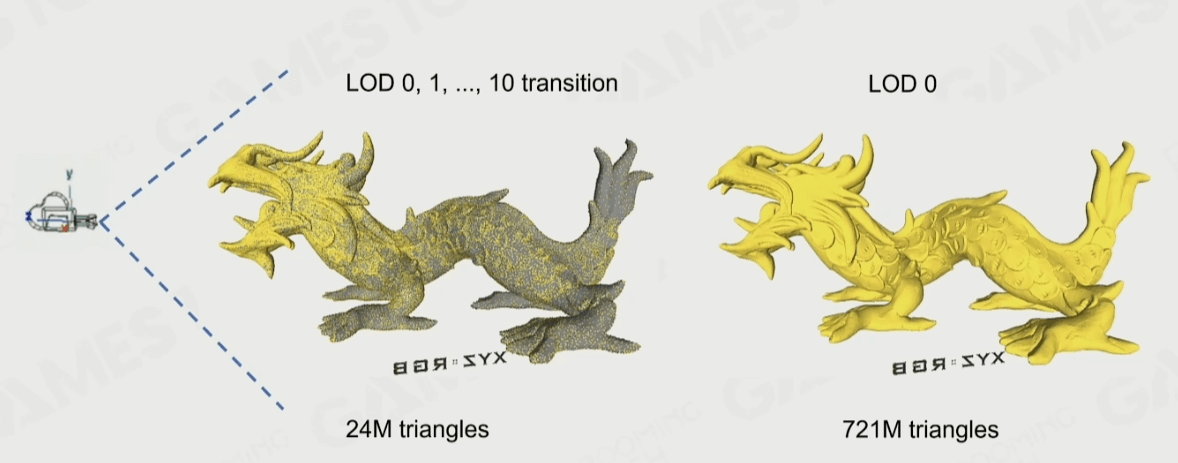
2. 技术要点
Nanite技术结合了多种技术做到了高效渲染:
Cluster Rendering:由Cluster组织三角形,可以享有更高效的剔除。
Auto LOD:通过Graph Partitioning技术划分和简化模型构建LOD,并且把数据组织成BVH结构在Runtime时候可以高效地并行选择LOD,通过这种方式构建的LOD过渡非常丝滑。
GPU Driven Pipeline:由GPU驱动的绘制,减少了CPU的性能开销。
Occlusion Culling:更细颗粒的遮挡剔除,用于剔除不可见的三角形。
Hardware/Software Rasterization:由于小三角形对于硬件光栅化非常不友好,所以针对这些三角形用Compute Shader执行软光栅提高效率。
Visibility Buffer:利用Visibility Buffer减少Overdraw,进一步提高GPU效率。
Streaming:加载只看到的相关数据,减少几何体对内存的压力。
3. 本文效果
由于Nanite系统非常庞大和有非常多的工程细节要处理,所以本文会简化和略过一些东西,仅实现核心部分,而且会与有UE5的版本有点出入。
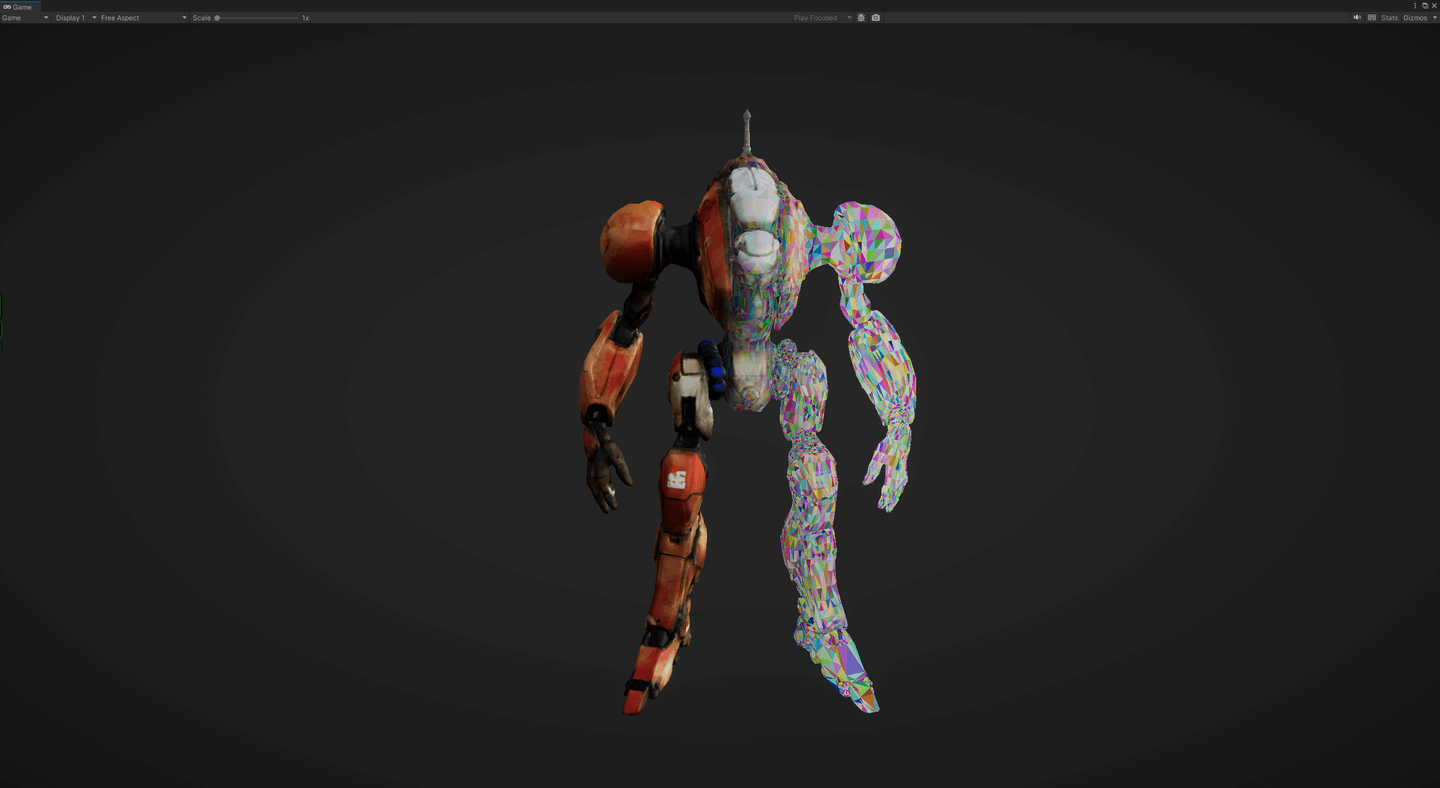
下图是本文实现的效果,每个色块是一个三角形,可以看出LOD切换和相机剔除都非常丝滑。
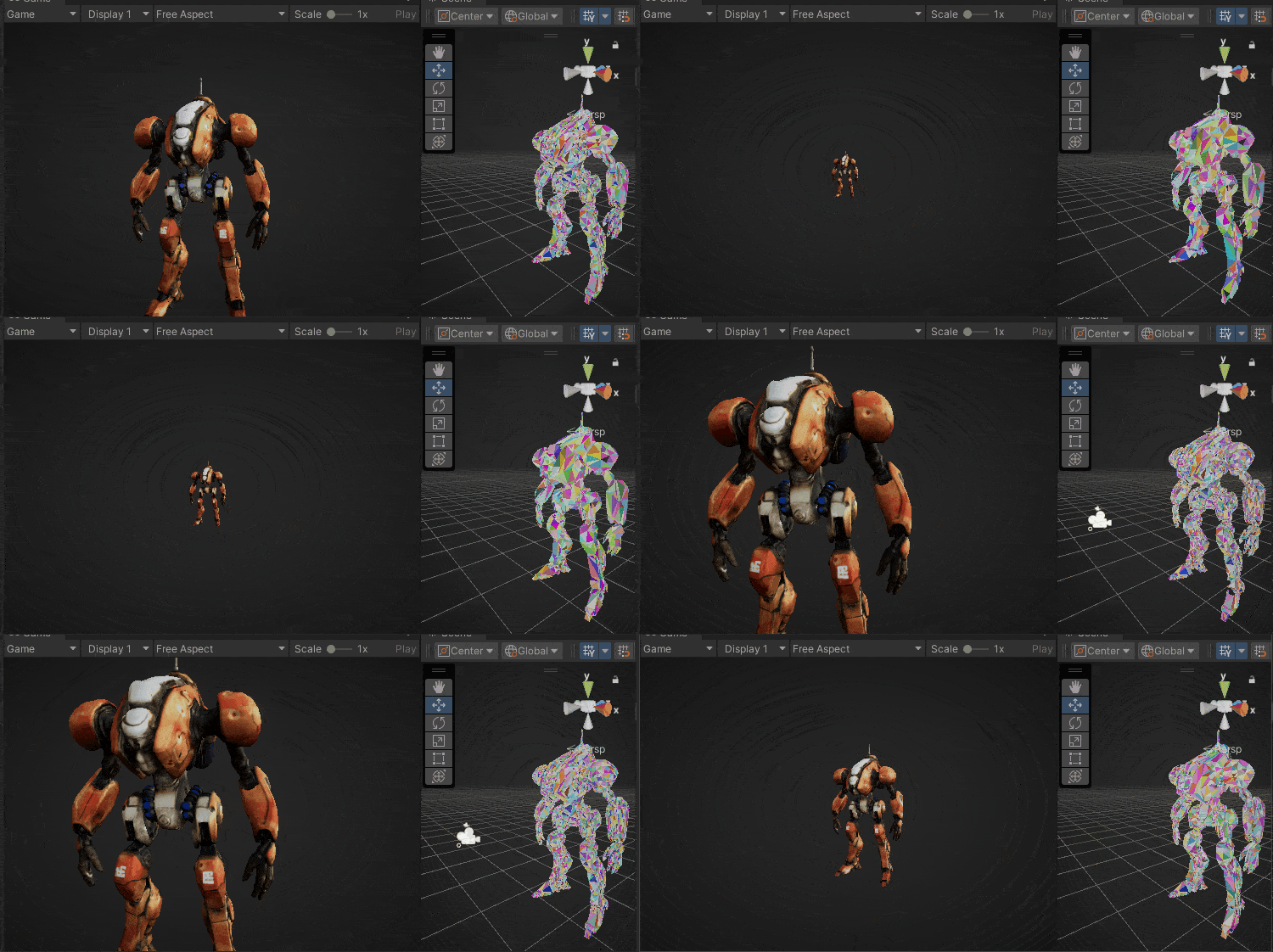
色块表示三角面
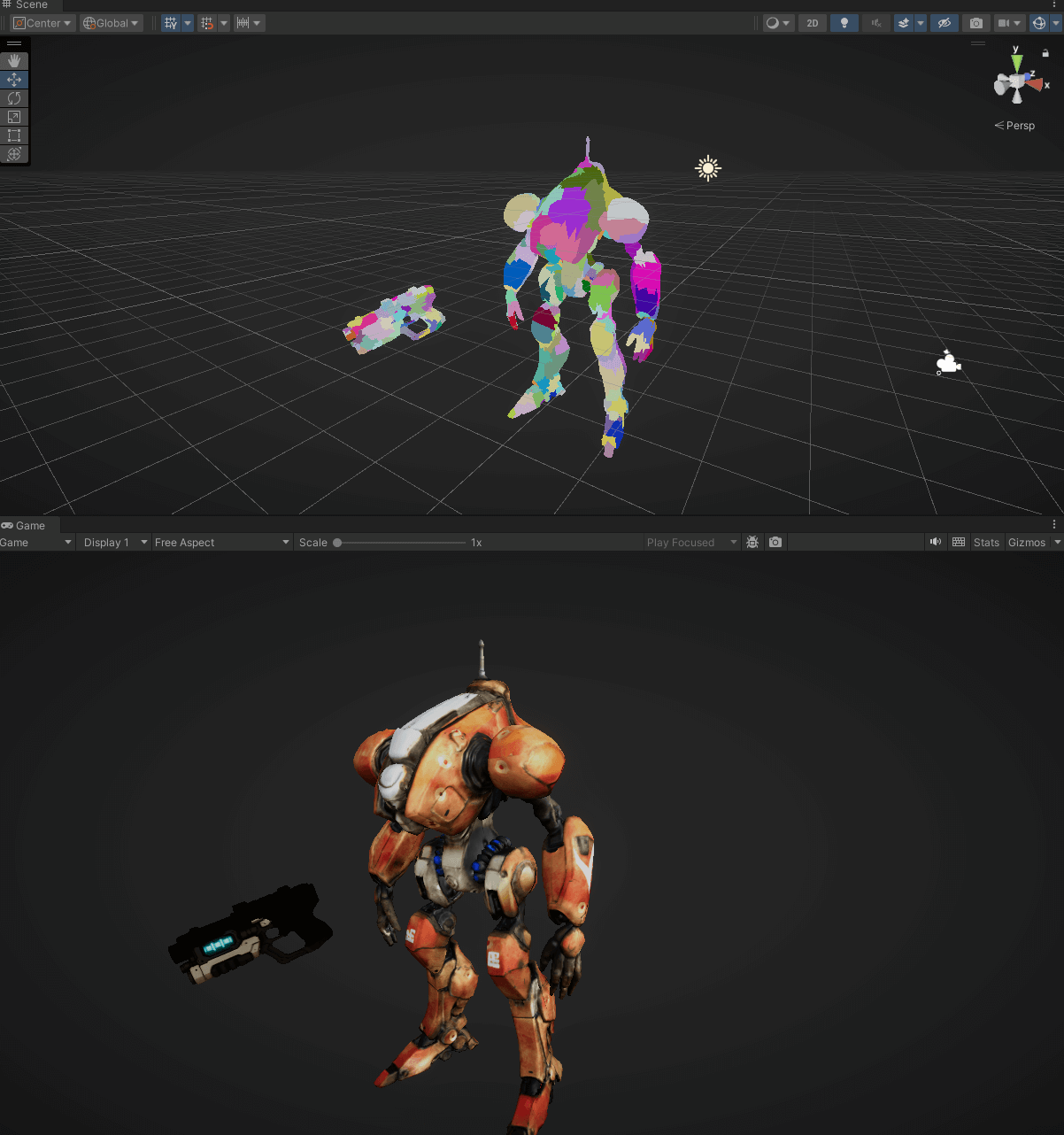
色块表示Cluster
二、实现
1. Clusterize
第一步,在离线阶段处理,将复杂的超高精度网格模型高效且合理地分割成更小、更易于管理的簇(Cluster),每个Cluster最多128个三角形。这种划分不是简单的切割,而是旨在最小化簇与簇之间连接的边数(即切割大小),同时保持每个簇的大小大致均衡。
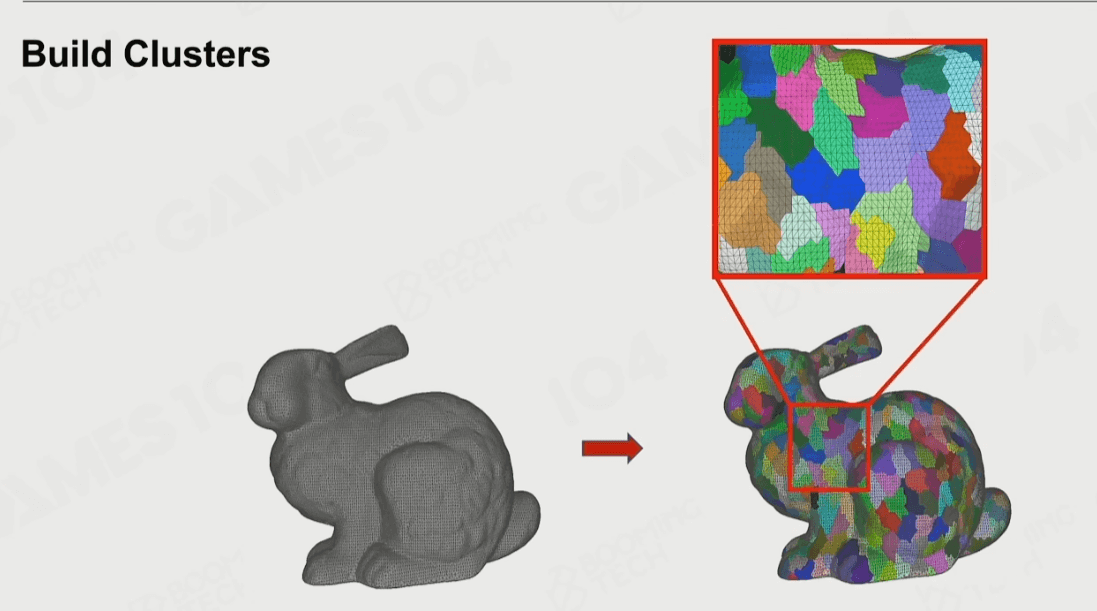
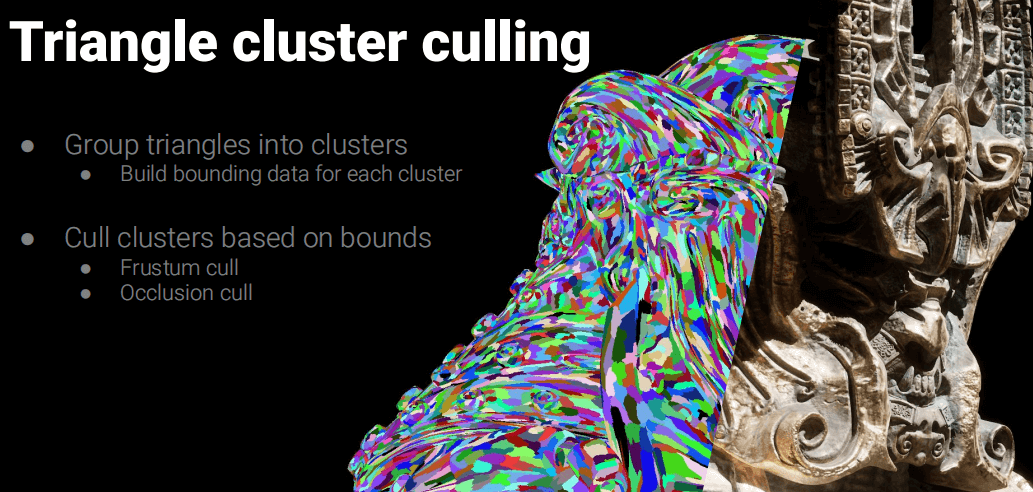
UE使用的Partition是Metis库:
https://github.com/KarypisLab/METIS
实现代码可以参考UE5的源码部分:
UnrealEngine-release\Engine\Source\Developer\NaniteBuilder\Private\NaniteBuilder.cpp
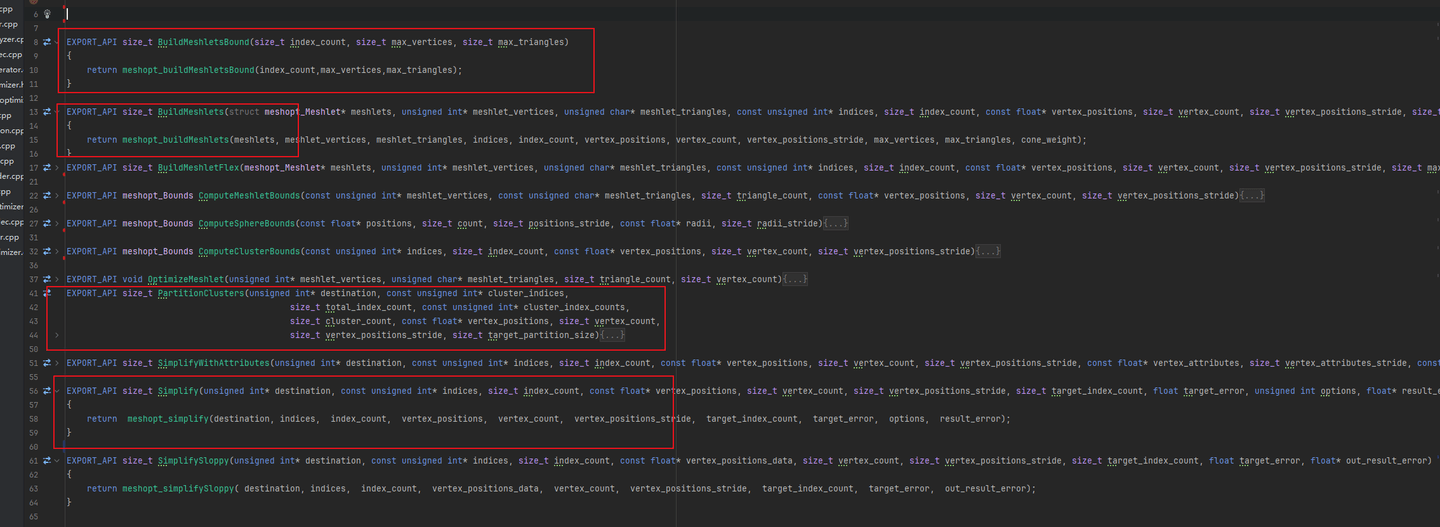
本文使用meshoptimizer实现Mesh的切分Cluster和Partition功能,这个库功能还有优化Over Draw,Shadow Depth Index等功能:
https://github.com/zeux/meshoptimizer
我们新建一个C++导出DLL的工程,封装几个主要函数让Unity可以使用。其实代码量不多,翻译成C#直接用也可以。
分别是:
- meshopt_buildMeshlets(构建Cluster)
- meshopt_partitionClusters(Cluster划分Partition)
- meshopt_buildMeshletsBound(计算Cluster数量)
- meshopt_computeSphereBounds(合并BoundsSphere)
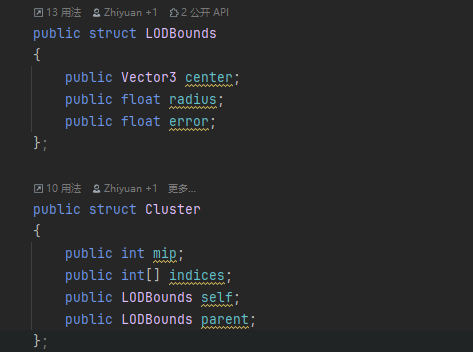
在C#中引用这些函数:

unsafe static List<Cluster> clusterize(Vector3[] vertices, int[] indices)
    {
        constint max_vertices = 192; // TODO: depends on kClusterSize, also may want to dial down for mesh shaders
        constint max_triangles = kClusterSize; //128
        constint min_triangles = (kClusterSize / 3) & ~3;
        constfloat split_factor = 2.0f;
        constfloat fill_weight = 0.75f;
        int max_meshlets = BuildMeshletsBound(indices.Length, max_vertices, max_triangles);//meshopt_buildMeshletsBound
        var meshlets = new Meshlet[max_meshlets * 2];
        var meshlet_vertices = newint[max_meshlets * max_vertices];
        var meshlet_triangles = newbyte[max_meshlets * max_triangles * 3];
        var meshlet_count = BuildMeshletFlex(meshlets, meshlet_vertices, meshlet_triangles, indices, indices.Length, vertices, vertices.Length, sizeof(float) * 3, max_vertices, min_triangles, max_triangles, 0.0f,
            split_factor);//meshopt_buildMeshlets
        List<Cluster> clusters = new List<Cluster>(meshlet_count);
        for (int i = 0; i < meshlet_count; i++)
        {
            ref Meshlet meshlet = ref meshlets[i];
            fixed (int* ptr = &meshlet_vertices[meshlet.vertex_offset])
            {
                fixed (byte* ptr2 = &meshlet_triangles[meshlet.triangle_offset])
                {
                    OptimizeMeshlet(ptr, ptr2, (int)meshlet.triangle_count, (int)meshlet.vertex_count);
                }
            }

            Cluster cluster = new Cluster();
            cluster.indices = newint[meshlet.triangle_count * 3];
            for (int j = 0; j < meshlet.triangle_count * 3; ++j)
                cluster.indices[j] =
                    meshlet_vertices[meshlet.vertex_offset + meshlet_triangles[meshlet.triangle_offset + j]];

            cluster.parent.error = float.MaxValue;
            clusters.Add(cluster);
        }

        return clusters;
    }
然后可以直接通过meshopt_buildMeshlets函数,获得每个cluster的indexs。
2. Build DAG
有了这些Cluster,就可以构建“LOD”了,只需要循环这个操作:打组->合并->减面->clusterize。如下图:
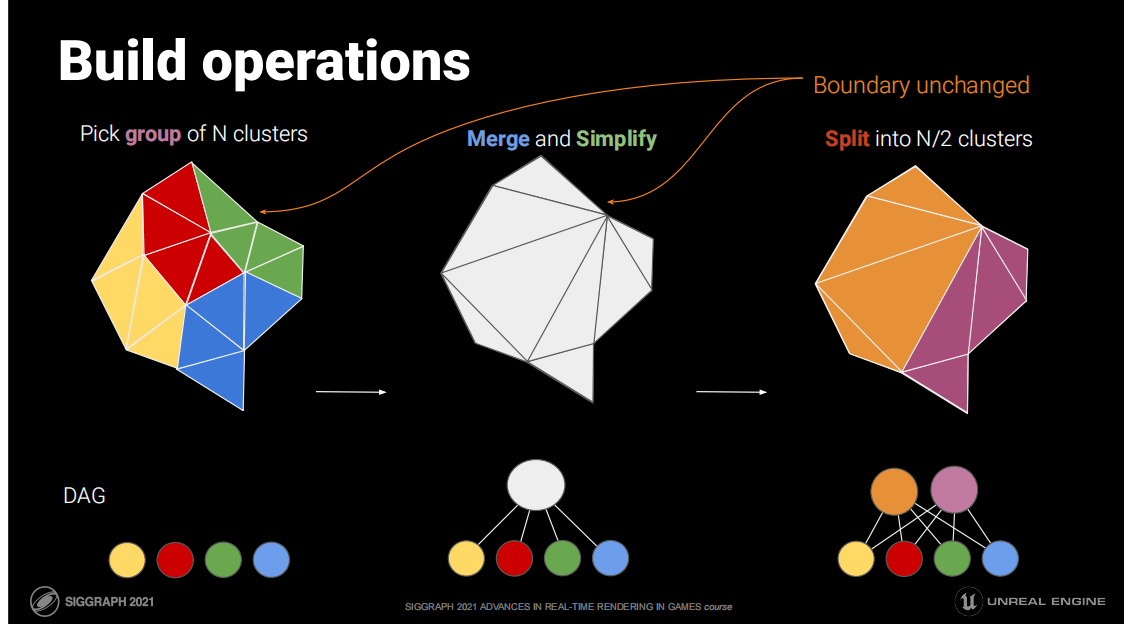
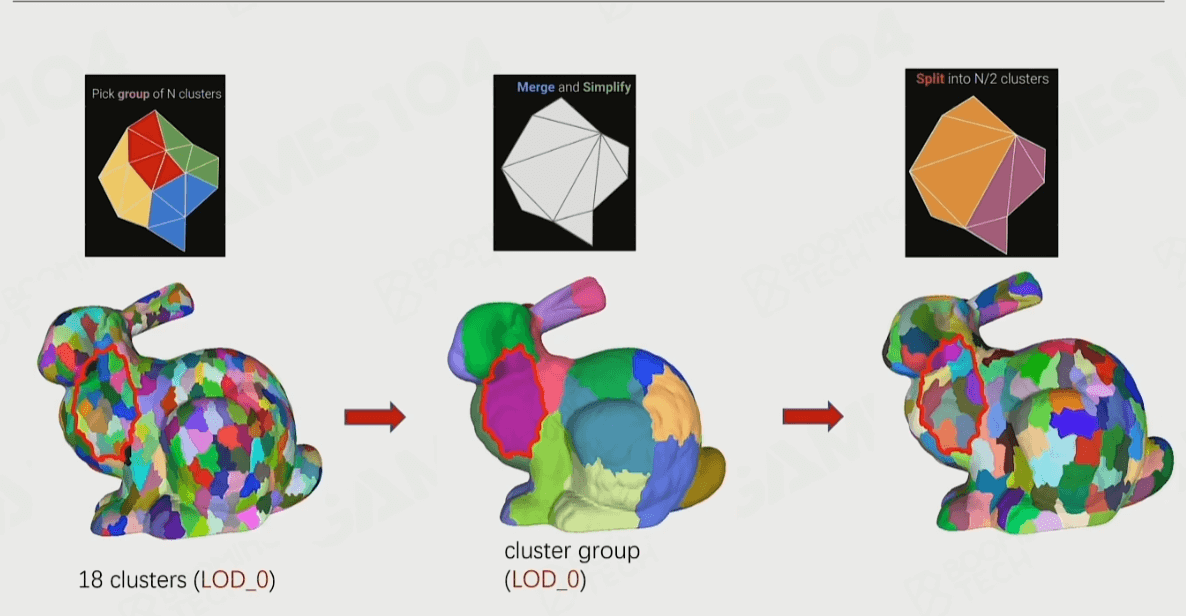
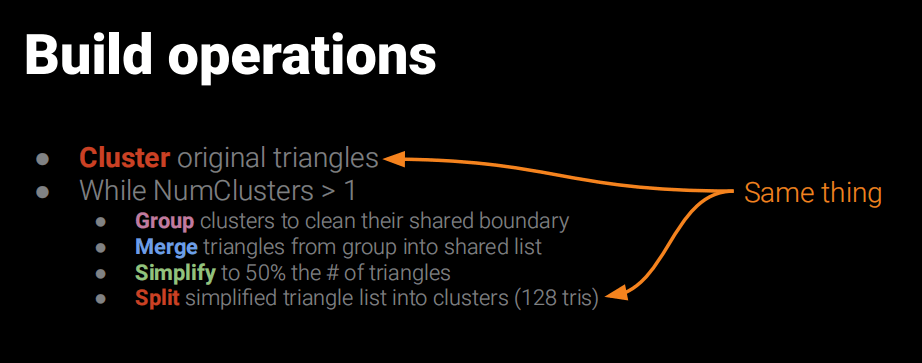
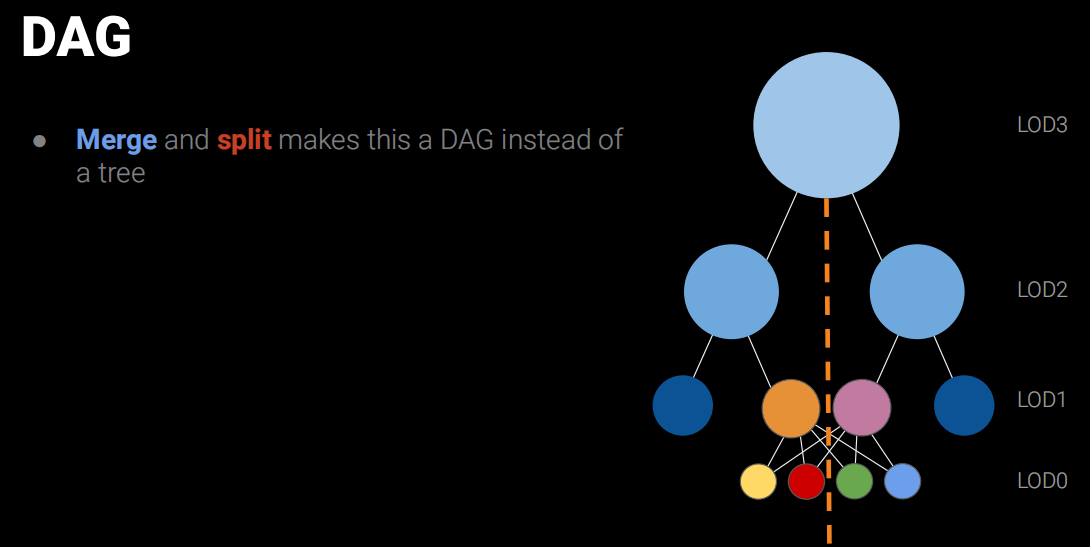
这个过程感觉就像Mipmap一样,一层一层往上合并和简化,并记录一个Err误差值和Bounds用于运行时LOD选择用。而这些合并的的节点就叫做Cluster Group。最后得出一个DAG(有向无环图,Directed Acyclic Graph)的结构。
public struct ClusterGroup
    {
        public List<int> Children;
        public Vector3 Bounds;
        publicfloat radius;
        public Vector3 LODBounds;
        publicfloat MinLODError;
        publicfloat MaxParentLODError;
        publicint MipLevel;
    }

publicclassNaniteSubMesh
    {
        public List<ClusterGroup> clusterGroupList;
        public List<Cluster> clusterList;
        publicint maxMipLevel;
    }

static NaniteSubMesh Nanite(Vector3[] vertices,Vector3[] normals, int[] indices)
    {
        NaniteSubMesh res = new NaniteSubMesh();
        List<ClusterGroup> clusterGroupList = new List<ClusterGroup>();
        var clusters = clusterize(vertices, indices);
        res.clusterList = clusters;
        res.clusterGroupList = clusterGroupList;
        res.maxMipLevel = 0;
        for (int i = 0; i < clusters.Count; ++i)
        {
            var c = clusters[i];
            c.self = Bounds(vertices, clusters[i].indices, 0f);
            c.mip = 0;
            clusters[i] = c;
        }

        List<int> pending = new List<int>(clusters.Count);
        int[] remap = newint[vertices.Length];
        for (int i = 0; i < remap.Length; ++i)
            remap[i] = i;
        for (int i = 0; i < clusters.Count; ++i)
            pending.Add(i);

        int curMip = 1;
        byte[] locks = newbyte[vertices.Length];
        while (pending.Count > 1)
        {
            List<List<int>> groups = partition(clusters, pending, remap, vertices);
            if (kUseLocks)
                lockBoundary(locks, groups, clusters, remap);
            pending.Clear();
            List<int> retry = new List<int>();
            int triangles = 0;
            int stuck_triangles = 0;
            for (int i = 0; i < groups.Count; ++i)
            {
                var curGroupClusters = groups[i];
                if (curGroupClusters.Count == 0)
                {
                    continue; // metis shortcut
                }

                List<int> merged = new List<int>(vertices.Length);
                for (int j = 0; j < curGroupClusters.Count; ++j)
                {
                    merged.AddRange(clusters[curGroupClusters[j]].indices);
                }
                LODBounds groupb = boundsMerge(clusters, curGroupClusters);
                ClusterGroup clusterGroup = new ClusterGroup();
                clusterGroup.Bounds = groupb.center;
                clusterGroup.MaxParentLODError = groupb.error;
                clusterGroup.radius = groupb.radius;
                clusterGroup.Children = new List<int>(merged.Count);
                clusterGroup.MipLevel = curMip - 1;
                for (int j = 0; j < curGroupClusters.Count; ++j)
                {
                    clusterGroup.Children.Add(curGroupClusters[j]);
                }
                clusterGroupList.Add(clusterGroup);

                // aim to reduce group size in half
                int target_size = (merged.Count / 3) / 2 * 3;
                float error = 0f;
                var simplified = simplify(vertices, normals, merged.ToArray(), kUseLocks ? locks : null, target_size,
                    ref error);
                if (simplified.Count > merged.Count * kSimplifyThreshold)
                {
                    stuck_triangles += merged.Count / 3;
                    for (int j = 0; j < curGroupClusters.Count; ++j)
                    {
                        retry.Add(curGroupClusters[j]);
                    }

                    continue; // simplification is stuck; abandon the merge
                }

                // enforce bounds and error monotonicity
                // note: it is incorrect to use the precise bounds of the merged or simplified mesh, because this may violate monotonicity

                var split = clusterize(vertices, simplified.ToArray());
                groupb.error += error; // this may overestimate the error, but we are starting from the simplified mesh so this is a little more correct
                // update parent bounds and error for all clusters in the group
                // note that all clusters in the group need to switch simultaneously so they have the same bounds
                for (int j = 0; j < curGroupClusters.Count; ++j)
                {
                    int clusterIndex = curGroupClusters[j];
                    var t = clusters[clusterIndex];
                    t.parent = groupb;
                    clusters[clusterIndex] = t;
                }

                for (int j = 0; j < split.Count; ++j)
                {
                    var sj = split[j];
                    sj.self = groupb;
                    sj.mip = curMip;
                    split[j] = sj;
                    clusters.Add(sj); // std::move
                    pending.Add(clusters.Count - 1);
                    triangles += sj.indices.Length / 3;
                }
            }

            curMip++;
        }

        if (pending.Count == 1)
        {
            var c = clusters[pending[0]];
            ClusterGroup clusterGroup = new ClusterGroup();
            clusterGroup.Bounds = c.self.center;
            clusterGroup.MaxParentLODError = c.self.error;
            clusterGroup.radius = c.self.radius;
            clusterGroup.Children = new List<int>(1);
            clusterGroup.MipLevel = curMip - 1;
            clusterGroup.Children.Add(pending[0]);
            clusterGroupList.Add(clusterGroup);
        }

        res.maxMipLevel = curMip - 1;
        return res;
    }

static void lockBoundary(byte[] locks, List<List<int>> groups, List<Cluster> clusters, int[] remap)
    {
        // for each remapped vertex, keep track of index of the group it's in (or -2 if it's in multiple groups)
        int[] groupmap = newint[locks.Length];
        for (int i = 0; i < groupmap.Length; ++i)
            groupmap[i] = -1;

        for (int i = 0; i < groups.Count; ++i)
        {
            var c = groups[i];
            for (int j = 0; j < c.Count; ++j)
            {
                var indices = clusters[c[j]].indices;
                for (int k = 0; k < indices.Length; ++k)
                {
                    var v = indices[k];
                    var r = remap[v];

                    if (groupmap[r] == -1 || groupmap[r] == i)
                        groupmap[r] = i;
                    else
                        groupmap[r] = -2;
                }
            }
        }

        // note: we need to consistently lock all vertices with the same position to avoid holes
        for (int i = 0; i < locks.Length; ++i)
        {
            var r = remap[i];
            locks[i] = (byte)((groupmap[r] == -2) ? 1 : 0);
        }
    }
这样我们得到各级Mip的一系列Clusters。
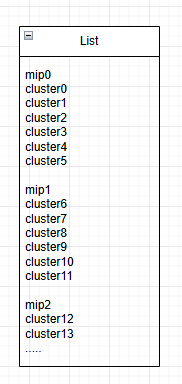
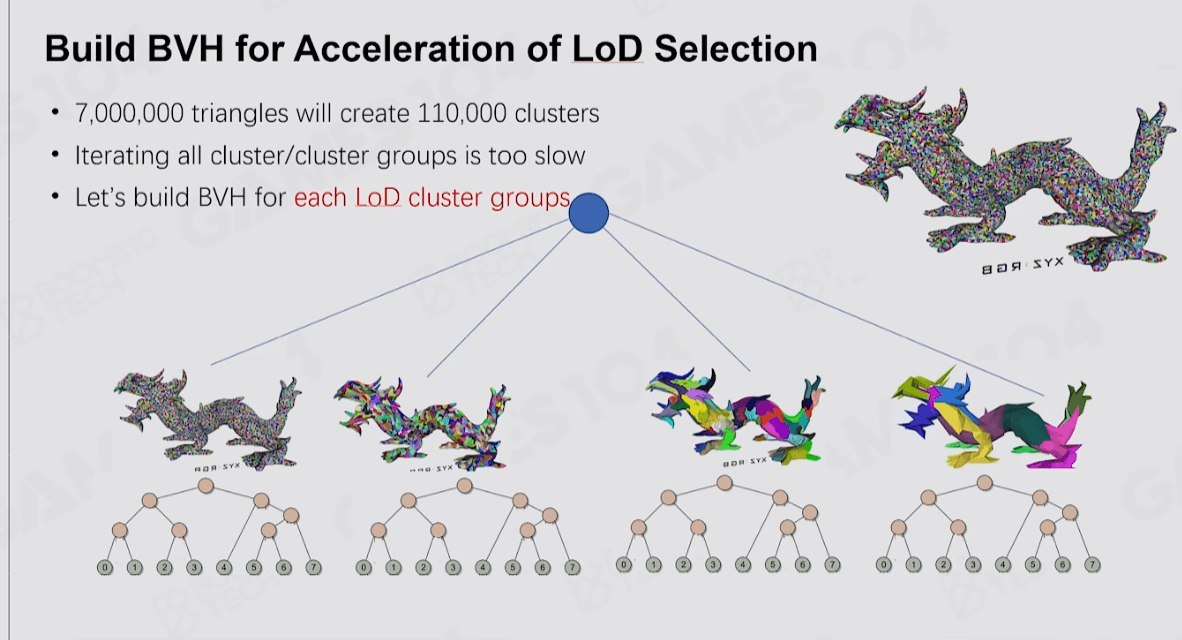
3. 加速结构
即使把三角形划分成Clusters数量也太多,使用Compute Shader来做并行结算效率也不高,于是Nanite就使用了BVH来作为ClusterGroup的加速结构,然后配合Persistent Threads做查找过滤。
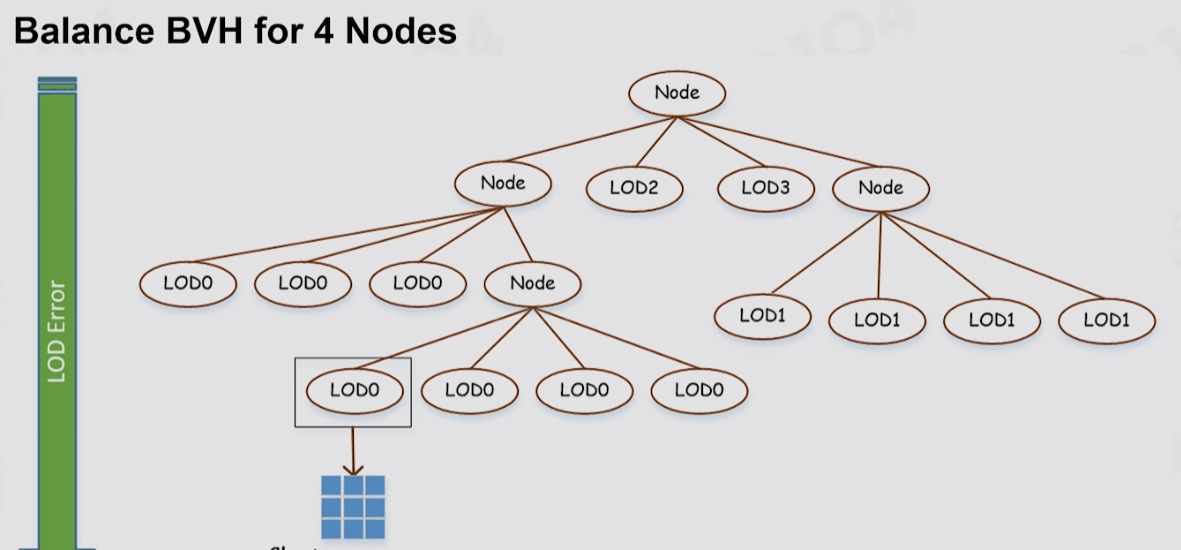
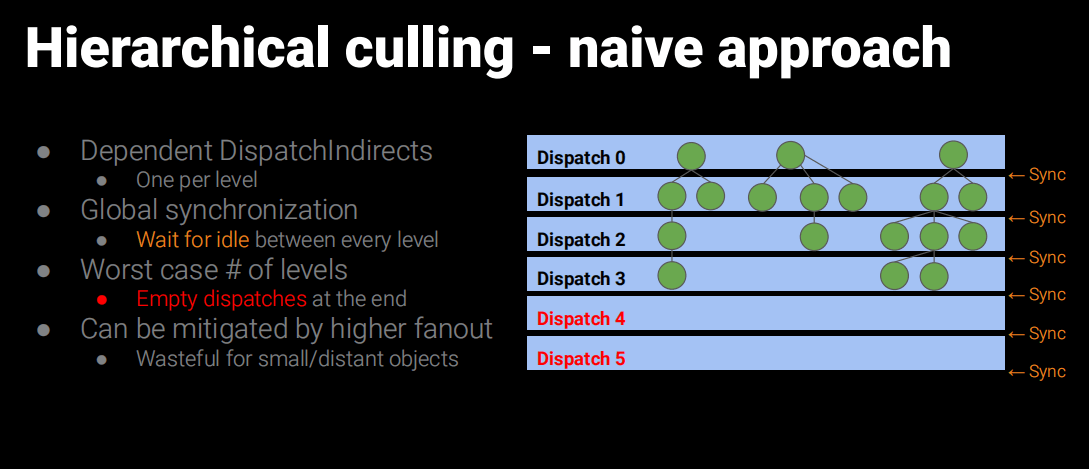
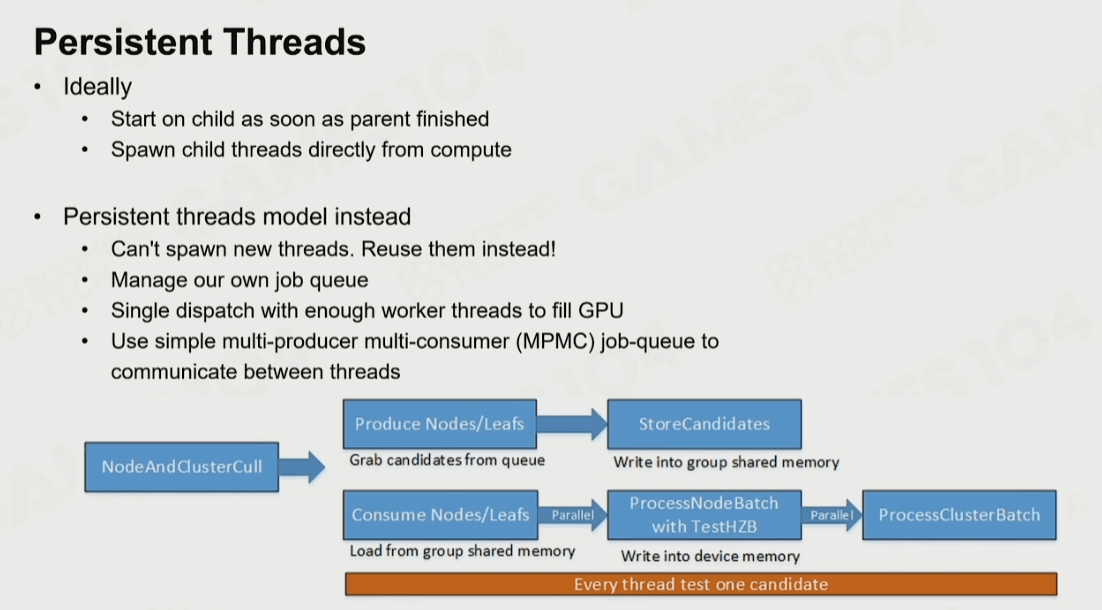
Persistent Threads遍历BVH部分,有兴趣可以参考UE5源码:
Shaders\Private\Nanite\NaniteClusterCulling.usf
UE5中也有不使用Persistent Threads的流程,应该说一般默认就是不使用的。
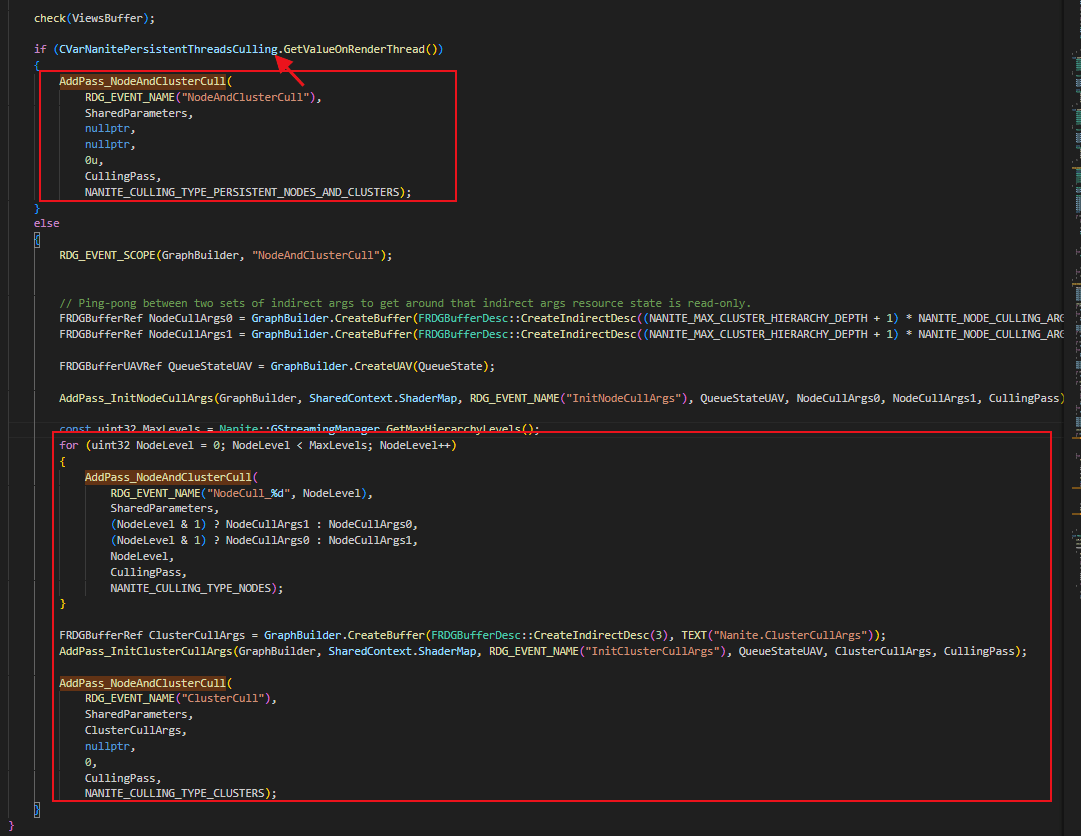
UE5源码部分
个人认为Persistent Threads方案在GPU遍历这种BVH结构有点暴力和重度,所以简化了一下,把多个Cluster合并成一个剔除单元(Part),先并行对Part做剔除,再对Part里的Cluster去做并行剔除,两层结构来加速作为Persistent Threads的一个简单替代方案。
然后把多个Part组织成Page用于分块加载。材质处理细节也不同,UE5的材质是每个Cluster会记录MaterialRange,简单起见这里实现是每个SubMesh会去构建独立的Clusters。
代码如下:
 [Serializable]
    publicstruct NaniteCluster
    {
        publicint indiceIndex;
        publicint indiceCount;
        publicfloat selfErrer;
        publicfloat parentErrer;
        public Vector4 selfSphere;
        public Vector4 parentSphere;
        publicint subMeshID;
        publicint vertexOffset;
    };

    [Serializable]
    publicstruct NaniteClusterGroup
    {
        publicint ClusterStart;
        publicint ClusterCount;
        public Vector3 Bounds;
        publicfloat radius;
        public Vector3 LODBounds;
        publicfloat MinLODError;
        publicfloat MaxParentLODError;
        publicint MipLevel;
    }

    [Serializable]
    publicstruct NaniteMeshPart
    {
        publicint ClusterStart;
        publicint ClusterCount;
        public Vector4 selfSphere;
        publicfloat MaxParentLODError;
    }
public classNaniteSubMesh
    {
        public List<ClusterGroup> clusterGroupList;
        public List<Cluster> clusterList;
        publicint maxMipLevel;
    }
publicclassBuildPart
    {
        public List<int> clusterList;
        publicint mip;
        publicint subMesh;

    }
public static void BuildNaniteMesh(Mesh mesh)
    {
          var vertices = mesh.vertices;
        var normals = mesh.normals;
        var uvs = mesh.uv;

        int subMeshCount = mesh.subMeshCount;
        int totalClusterCount = 0;
        int totalIndexCount = 0;
        List<NaniteSubMesh> subMeshList = new List<NaniteSubMesh>();
        for (int i = 0; i < subMeshCount; i++)
        {
            var triangles = mesh.GetTriangles(i);
            var subMesh = Nanite(vertices,normals,triangles);
            subMeshList.Add(subMesh);
            totalClusterCount += subMesh.clusterList.Count;
        }

        List<BuildPart> buildPartsList = new List<BuildPart>(totalClusterCount);
        int MAX_PART_PERPAGE = 128;
        int MAX_CLUSTER_PERPART = 8;

        for (int subMeshIndex = 0; subMeshIndex < subMeshList.Count; subMeshIndex++)
        {
            var subMesh = subMeshList[subMeshIndex];
            List<Cluster> clusters = subMesh.clusterList;
            var groupsList = subMesh.clusterGroupList;
            BuildPart buildPart = null;
            for (int i = 0; i < groupsList.Count; i++)
            {
                var gIndex = i; // sortGroups[i].OldIndex;
                var g = groupsList[gIndex];
                var childs = g.Children;
                for (int c = 0; c < childs.Count; c++)
                {
                    int cIndex = childs[c];
                    int cMip = clusters[cIndex].mip;
                    totalIndexCount += clusters[cIndex].indices.Length;
                    //new Part
                    if (buildPart == null || buildPart.clusterList.Count >= MAX_CLUSTER_PERPART ||
                        buildPart.mip != cMip)
                    {
                        buildPart = new BuildPart();
                        buildPart.clusterList = new List<int>(MAX_CLUSTER_PERPART);
                        buildPart.mip = cMip;
                        buildPart.subMesh = subMeshIndex;
                        buildPartsList.Add(buildPart);
                    }

                    buildPart.clusterList.Add(cIndex);
                }
            }
        }

        int buildPartCount = buildPartsList.Count;
        NaniteMeshPage[] pageArray = new NaniteMeshPage[(buildPartCount+(MAX_PART_PERPAGE-1))/MAX_PART_PERPAGE];//ceil
        List<int> tempIndiceList = new List<int>(totalIndexCount);
        List<int> mipLists = new List<int>(totalClusterCount);
        int partIndex = 0;
        for (int i = 0; i < pageArray.Length; i++)
        {
            //create new page
            var p = ScriptableObject.CreateInstance<NaniteMeshPage>();
            pageArray[i] = p;
            tempIndiceList.Clear();
            int partCount =  (i == (pageArray.Length -1)) ? (buildPartCount % MAX_PART_PERPAGE) : MAX_PART_PERPAGE;
            p.parts = new NaniteScene.NaniteMeshPart[partCount];
            List<NaniteScene.NaniteCluster> pageClusters = new List<NaniteScene.NaniteCluster>(partCount * MAX_CLUSTER_PERPART);
            for (int j = 0; j < partCount; j++)
            {
                var buildPart = buildPartsList[partIndex];
                var buildPartCluster = buildPart.clusterList;
                //create part
                var part = new NaniteScene.NaniteMeshPart();
                part.ClusterStart = pageClusters.Count; //local index
                part.ClusterCount = buildPartCluster.Count;
                int subMeshID = buildPart.subMesh;
                float maxParentErr = 0f;
                var clusters = subMeshList[subMeshID].clusterList;
                for (int c = 0; c < buildPartCluster.Count; c++)
                {
                    var cluster = clusters[buildPartCluster[c]];
                    mipLists.Add(cluster.mip);
                    //create Cluster
                    NaniteScene.NaniteCluster naniteCluster = new NaniteScene.NaniteCluster();
                    naniteCluster.indiceIndex = tempIndiceList.Count;
                    naniteCluster.indiceCount = cluster.indices.Length;
                    naniteCluster.parentErrer = cluster.parent.error;
                    naniteCluster.parentSphere = new Vector4(cluster.parent.center.x,cluster.parent.center.y,cluster.parent.center.z, cluster.parent.radius);
                    naniteCluster.selfErrer = cluster.self.error;
                    naniteCluster.selfSphere = new Vector4(cluster.self.center.x,cluster.self.center.y,cluster.self.center.z, cluster.self.radius);
                    naniteCluster.subMeshID = subMeshID;
                    tempIndiceList.AddRange(cluster.indices);
                    maxParentErr = Mathf.Max(naniteCluster.parentErrer, maxParentErr);
                    pageClusters.Add(naniteCluster);
                }

                LODBounds partBounds =  boundsMerge(clusters, buildPartCluster,true);
                part.selfSphere = new Vector4(partBounds.center.x,partBounds.center.y,partBounds.center.z,partBounds.radius);
                part.MaxParentLODError = maxParentErr;
                p.parts[j] = part;
                partIndex++;
            }
            p.clusterArray = pageClusters.ToArray();
            p.indiceArray = tempIndiceList.ToArray();
            p.clusterMip = mipLists.ToArray();
        }

        string fileName = AssetDatabase.GetAssetPath(mesh);
        string extension = Path.GetExtension(fileName);
        fileName = fileName.Replace(extension, "");
        //Build page
        int totalVerts = 0;
        for (int i = 0; i < pageArray.Length; i++)
        {
            var page = pageArray[i];
            var clusterArray = page.clusterArray;
            var indiceArray = page.indiceArray;
            Dictionary<int,int> indicesMap = new Dictionary<int,int>();
            List<Vector3> tempVerts = new List<Vector3>(vertices.Length);
            List<Vector3> tempNormals = new List<Vector3>(vertices.Length);
            List<Vector2> tempUVs = new List<Vector2>(vertices.Length);
            List<int> newIndices = new List<int>(totalIndexCount);
            for (int c = 0; c < clusterArray.Length; c++)
            {
                refvar cluster = ref clusterArray[c];
                var indexStart = cluster.indiceIndex;
                var indexEnd = indexStart+cluster.indiceCount;
                for (int index = indexStart; index < indexEnd; index++)
                {
                    int vertIndex = indiceArray[index];
                    int newIndex;
                    if (!indicesMap.TryGetValue(vertIndex,out newIndex))
                    {
                        newIndex = newIndices.Count;
                        indicesMap.Add(vertIndex, newIndex);
                        tempVerts.Add(vertices[vertIndex]);
                        tempNormals.Add(normals[vertIndex]);
                        if (uvs.Length == 0)
                        {
                            tempUVs.Add(Vector2.zero);
                        }
                        else
                        {
                            tempUVs.Add(uvs[vertIndex]);
                        }

                        newIndices.Add(newIndex);
                    }

                    indiceArray[index] = newIndex;
                }
            }

            page.vertexStride = 5;//pos3 + uv2
            page.vertexData = newfloat[tempVerts.Count * page.vertexStride];
            page.vertexCount = tempVerts.Count;
            for (int v = 0; v < tempVerts.Count; v++)
            {
                int vertexIndex = v * page.vertexStride;
                page.vertexData[vertexIndex + 0] = tempVerts[v].x;
                page.vertexData[vertexIndex + 1] = tempVerts[v].y;
                page.vertexData[vertexIndex + 2] = tempVerts[v].z;
                page.vertexData[vertexIndex + 3] = tempUVs[v].x;
                page.vertexData[vertexIndex + 4] = tempUVs[v].y;
            }
            totalVerts +=tempVerts.Count;
            string newPath = fileName + "_p"+i +".asset";
            AssetDatabase.CreateAsset(page, newPath);
        }
        AssetDatabase.Refresh();

        Debug.Log("mesh Vertx:"+vertices.Length +" mesh Nanite:"+ totalVerts + " cluster:"+totalClusterCount + "part:"+ buildPartCount +" page:"+pageArray.Length);
        NaniteMesh naniteMesh = ScriptableObject.CreateInstance<NaniteMesh>();
        {
            naniteMesh.subMeshCount = subMeshCount;
            naniteMesh.pageArray = new NaniteMeshPage[pageArray.Length];
            for (int i = 0; i < pageArray.Length; i++)
            {
                string newPath = fileName + "_p" + i + ".asset";
                naniteMesh.pageArray[i] = AssetDatabase.LoadAssetAtPath<NaniteMeshPage>(newPath);
            }
        }

        var meshBound = mesh.bounds;
        naniteMesh.boundingSphere = meshBound.center;
        naniteMesh.boundingSphere.w = meshBound.extents.magnitude;
        string meshExt = "_mesh.asset";
        AssetDatabase.CreateAsset(naniteMesh, fileName + meshExt);
        AssetDatabase.Refresh();
    }
到这里离线部分基本结束,可以得到一个Nanite的资源。当然UE5原文还做了很多操作,如BVH、Encode、编码、压缩、Page的划分、顶点属性优化等,个人认为这些都属于工程细节。
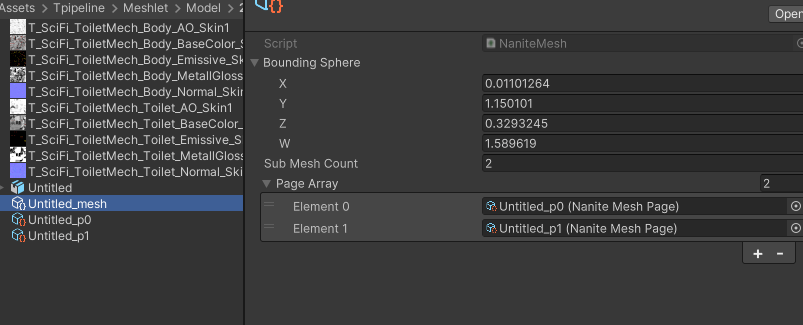
4. 运行时资源
来到Runtime部分,我们需要把这个Nanite Mesh加载上来,方便起见,这里直接引用一下资源在脚本上,偷懒省略加载部分。
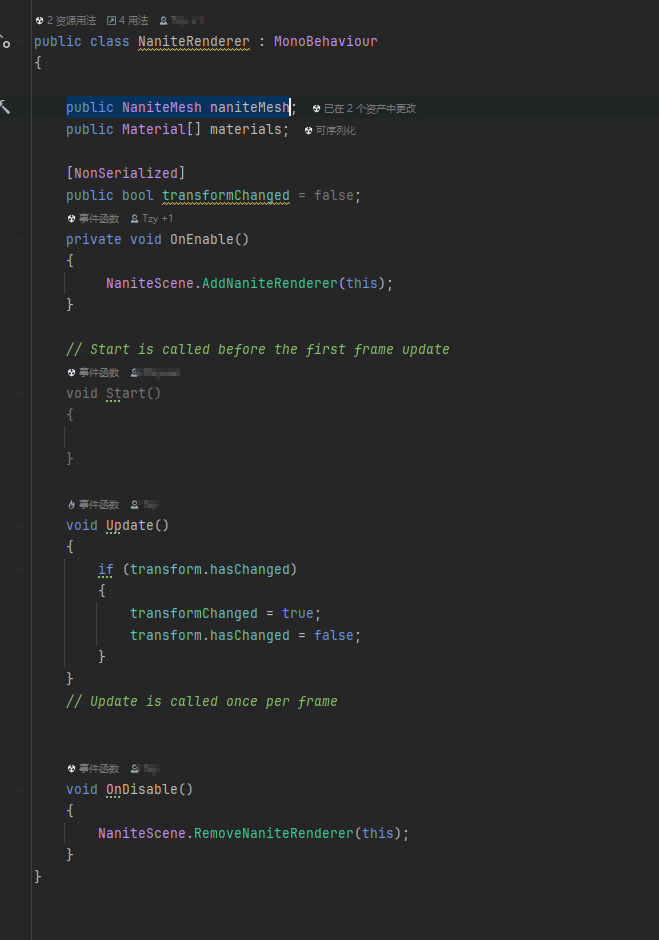
把资源、Object、材质信息整合起来,传到GPU的Buffer中。这里做法很不正式还是偷懒来处理。当然也可以用Compute Shader来更新Page数据到GPUBuffer中。
    public static List<NaniteRenderer> renderers = new List<NaniteRenderer>();
    privatestatic SceneObject[] gpuObjects = new SceneObject[2048];
    //cluster -> part -> page
    publicstruct SceneObject
    {
        publicint naniteMeshID;
        public Matrix4x4 localToWorldMatrix;
        publicint materialIDOffset;
    }
    publicstruct NaniteRes
    {
        public Vector4 boundingSphere;
        publicint partIndex;
        publicint partCount;
    }

unsafe static void UpdateRenderList()
    {
         if(renderers.Count == 0)
            return;
        //object update
        if (renderers.Count > gpuObjects.Length)
        {
            gpuObjects = new SceneObject[Mathf.NextPowerOfTwo(renderers.Count)];
        }

        objectCount = 0;
        maxPartCount = 0;
        naniteMeshes.Clear();
        materialList.Clear();
        List<int> materialIndices = new List<int>();
        for (int i = 0; i < renderers.Count; i++)
        {
           var renderer = renderers[i];
           var nMesh = renderer.naniteMesh;
            foreach (var p in nMesh.pageArray)
           {
               maxPartCount += p.parts.Length;
               maxClusterCount += p.clusterArray.Length;
           }

           SceneObject obj = new SceneObject();
           obj.localToWorldMatrix = renderer.transform.localToWorldMatrix;
            //mesh index
           int index = naniteMeshes.IndexOf(nMesh);
           if (index < 0)
           {
               index = naniteMeshes.Count;
               naniteMeshes.Add(nMesh);
           }
           obj.naniteMeshID = index;
           //mat indexs
           obj.materialIDOffset = materialIndices.Count;
           for (int m = 0; m < renderer.materials.Length; m++)
           {
               var mat = renderer.materials[m];
               int matIndex = materialList.IndexOf(mat);
               if (matIndex < 0)
               {
                   matIndex = materialList.Count;
                   materialList.Add(mat);
               }
               materialIndices.Add(matIndex);
           }
           gpuObjects[i] = obj;
           renderer.transformChanged = false;
           objectCount++;
        }

        if(candidateClusterBuffer!=null)
            candidateClusterBuffer.Dispose();
        candidateClusterBuffer = new GraphicsBuffer(GraphicsBuffer.Target.Structured, maxClusterCount *2, sizeof(int));

        if(visibleClusterBuffer != null)
            visibleClusterBuffer.Dispose();
        visibleClusterBuffer = new GraphicsBuffer(GraphicsBuffer.Target.Structured,maxClusterCount *2, sizeof(int));

        if (objectsBuffer != null)
            objectsBuffer.Dispose();
        objectsBuffer = new GraphicsBuffer(GraphicsBuffer.Target.Structured, objectCount, sizeof(SceneObject));
        objectsBuffer.SetData(gpuObjects,0,0,objectCount);

        if(visObjectsBuffer !=null)
            visObjectsBuffer.Dispose();
        visObjectsBuffer = new GraphicsBuffer(GraphicsBuffer.Target.Structured,objectCount, sizeof(int));

        int vertCount = 0;
        List<NaniteCluster> tempClusters = new List<NaniteCluster>(2048);
        List<NaniteMeshPart> tempParts = new List<NaniteMeshPart>(2048);
        List<NaniteRes> naniteRes = new List<NaniteRes>(2048);
        List<int> tempIndices = new List<int>(2048 * 100);
        List<float> vertexDataList = new List<float>();
        //load page
        for (int nID = 0; nID < naniteMeshes.Count; nID++)
        {
            NaniteRes res = new NaniteRes();
            var nMesh = naniteMeshes[nID];
            //填充到GPU
            var pages = nMesh.pageArray;
            res.partIndex = tempParts.Count;
            res.partCount = 0;
            res.boundingSphere = nMesh.boundingSphere;
            for (int p = 0; p < pages.Length; p++)
            {
                var page = pages[p];
                var parts = page.parts;
                int vertOffset = vertCount;
                int indicesOffset = tempIndices.Count;
                int clusterOffset = tempClusters.Count;

                //add all cluster
                var clusters = page.clusterArray;
                for (int c = 0; c < clusters.Length; c++)
                {
                    var cluster = clusters[c];
                    cluster.indiceIndex += indicesOffset;
                    cluster.vertexOffset = vertOffset;
                    tempClusters.Add(cluster);
                }

                //add all part
                for (int partIndex = 0; partIndex < parts.Length; partIndex++)
                {
                    var part = parts[partIndex];
                    part.ClusterStart += clusterOffset;
                    tempParts.Add(part);
                    res.partCount++;
                }

                //add page data
                tempIndices.AddRange( page.indiceArray);
                vertexDataList.AddRange(page.vertexData);
                vertCount += page.vertexCount;
            }
            naniteRes.Add(res);
        }

        //TODO GPU Update Buffer
        if (naniteResBuffer != null)
            naniteResBuffer.Dispose();
        naniteResBuffer = new GraphicsBuffer(GraphicsBuffer.Target.Structured, naniteRes.Count, sizeof(NaniteRes));
        naniteResBuffer.SetData(naniteRes);

        if (partsBuffer != null)
            partsBuffer.Dispose();
        partsBuffer = new GraphicsBuffer(GraphicsBuffer.Target.Structured,tempParts.Count, sizeof(NaniteMeshPart));
        partsBuffer.SetData(tempParts);

        if (clusterBuffer != null)
            clusterBuffer.Dispose();
        clusterBuffer = new GraphicsBuffer(GraphicsBuffer.Target.Structured, tempClusters.Count, sizeof(NaniteCluster));
        clusterBuffer.SetData(tempClusters);


        if (indiceseBuffer != null)
            indiceseBuffer.Dispose();
        indiceseBuffer = new GraphicsBuffer(GraphicsBuffer.Target.Raw, tempIndices.Count, sizeof(int));
        indiceseBuffer.SetData(tempIndices);

        if(materialIndexBuffer!=null)
            materialIndexBuffer.Dispose();
        materialIndexBuffer = new GraphicsBuffer(GraphicsBuffer.Target.Structured,materialIndices.Count, sizeof(int));
        materialIndexBuffer.SetData(materialIndices);

        if(vertexDataBuffer!=null)
            vertexDataBuffer.Dispose();
        vertexDataBuffer = new GraphicsBuffer(GraphicsBuffer.Target.Raw, vertexDataList.Count,sizeof(float));
        vertexDataBuffer.SetData(vertexDataList);
    }

    //input object ID =>
    public unsafe static void UpdateNaniteScene()
    {
        if (renderListDirty)
        {
            UpdateRenderList();
           // UpdateRenderListGPU();
            renderListDirty = false;
        }

       for (int i = 0; i < renderers.Count; i++)
       {
           var renderer = renderers[i];
           if (renderer.transformChanged)
           {
               gpuObjects[i].localToWorldMatrix = renderer.transform.localToWorldMatrix;
               renderer.transformChanged = false;
               transformDirty = true;
           }
       }

       if (objectsBuffer != null && transformDirty)
           objectsBuffer.SetData(gpuObjects, 0, 0, objectCount);
    }
5. 剔除
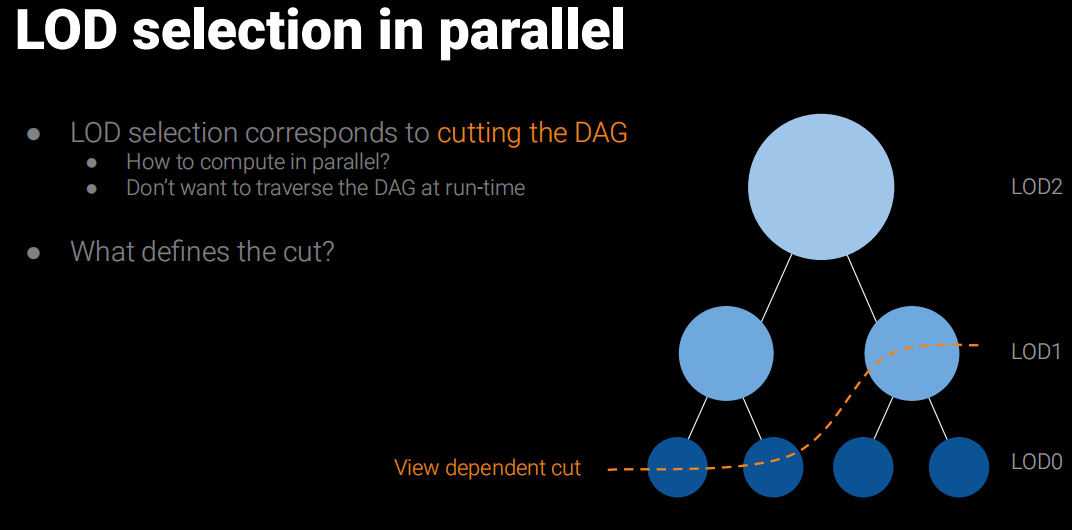
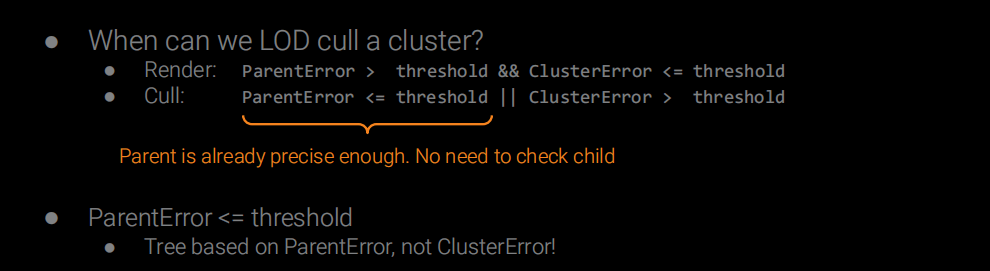
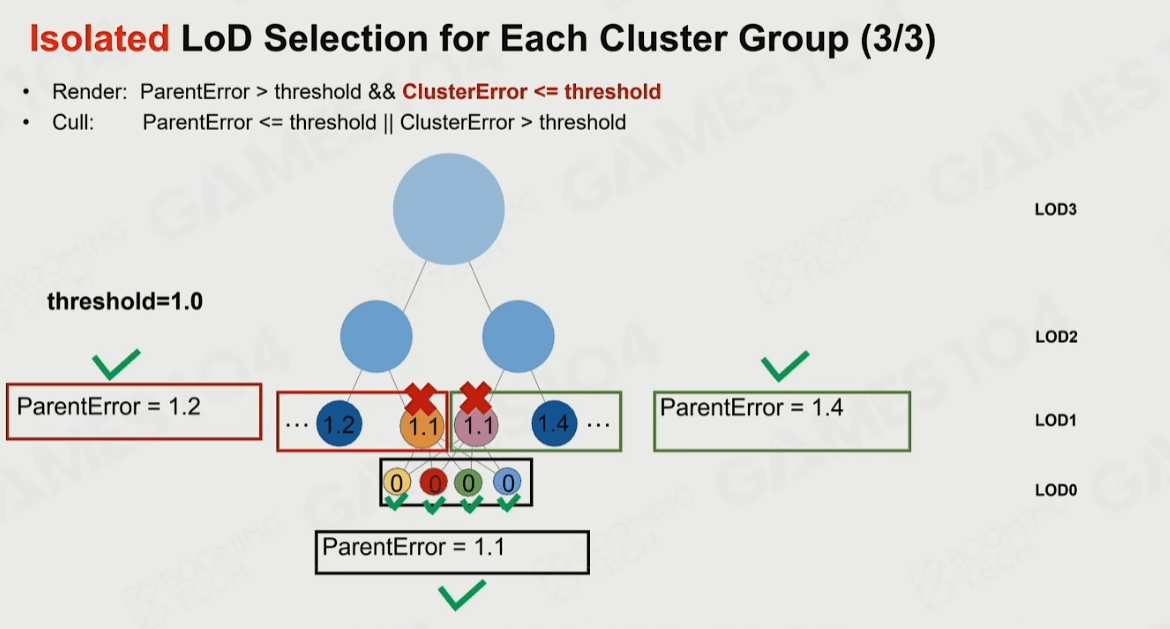
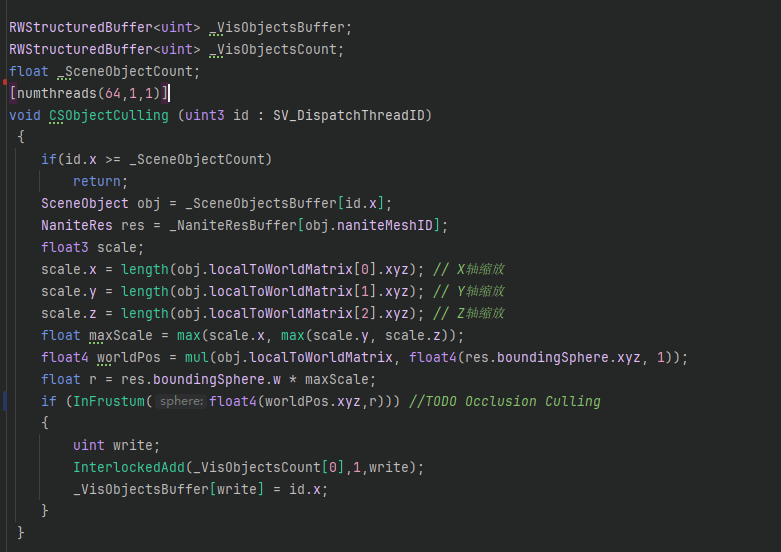
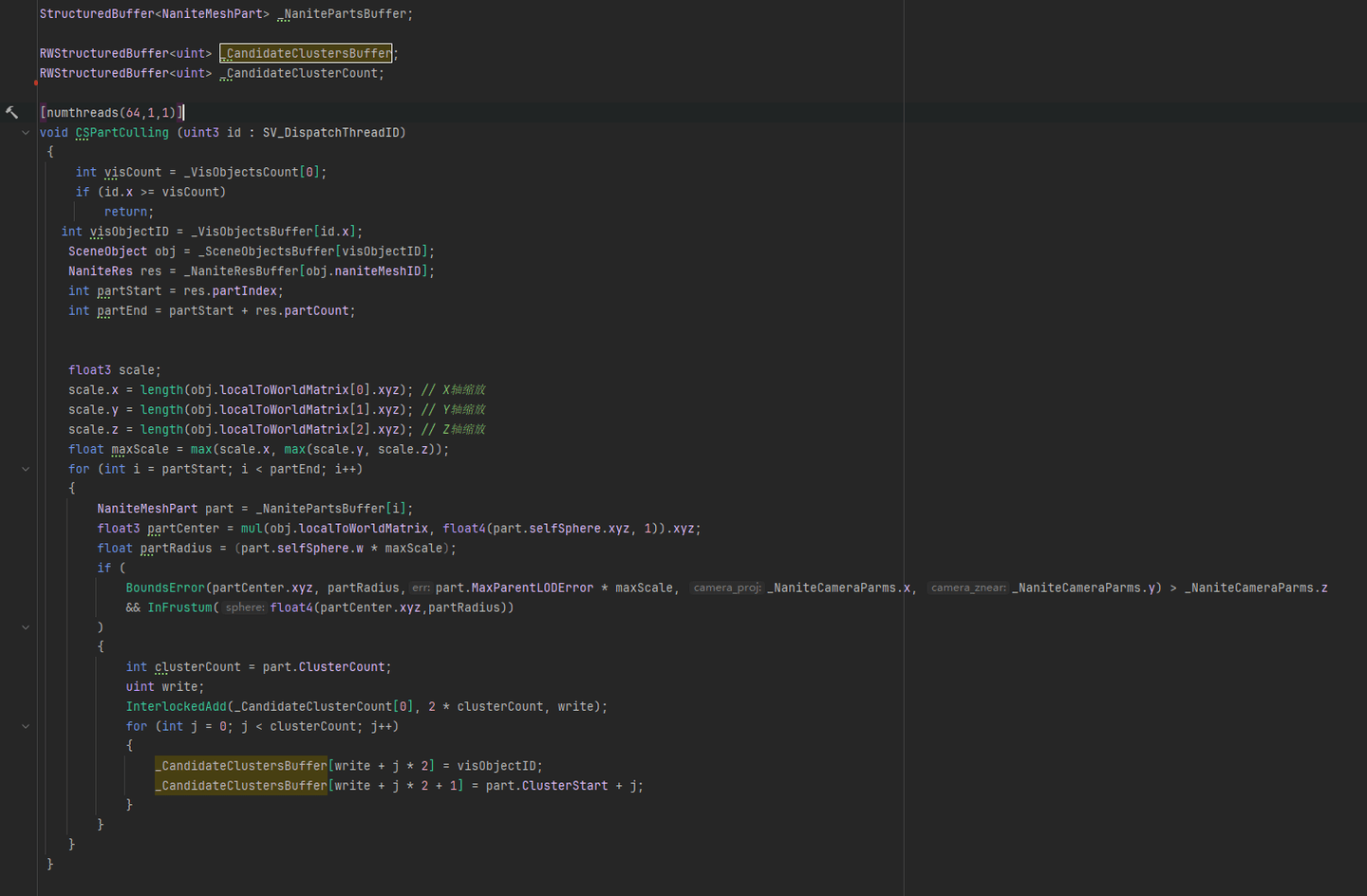
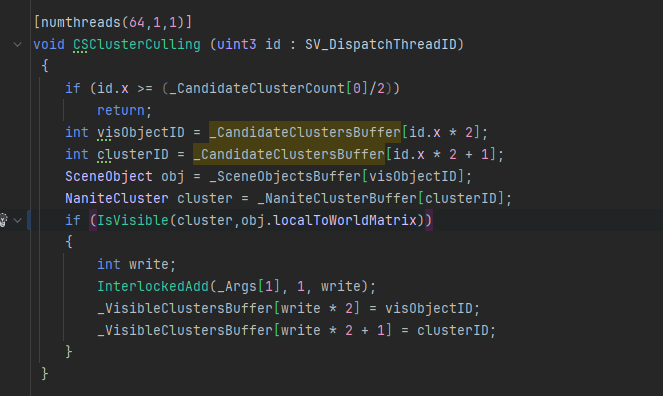
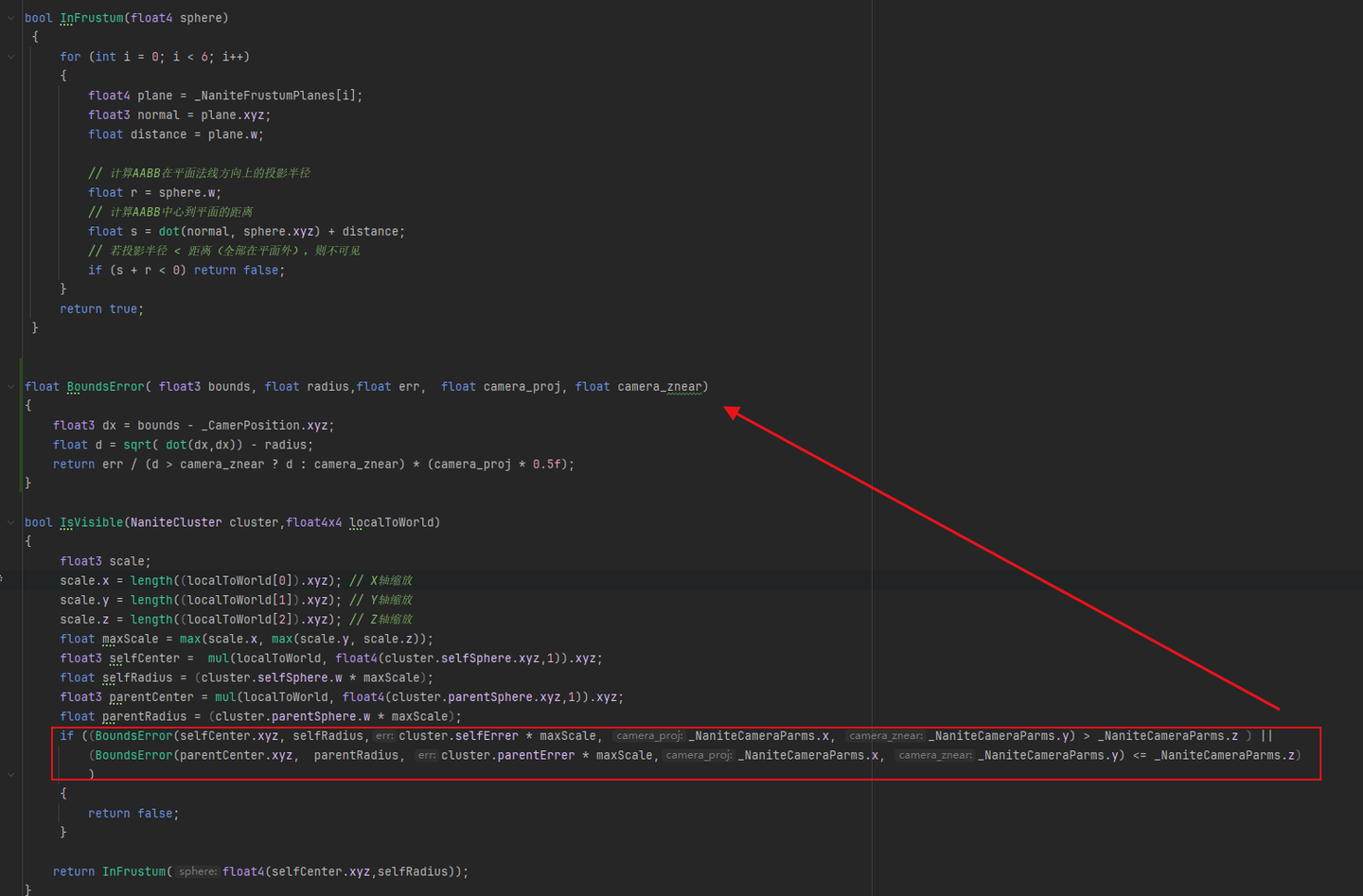
这时离线时候已经把Clusters扁平化到数组中了,这些Clusters是可以并行进行剔除的,巧妙之处是他记录了父级的误差和自己的误差,当我们传入误差系数时候就可以独立地判断自己是否被剔除,而和上下级无关。
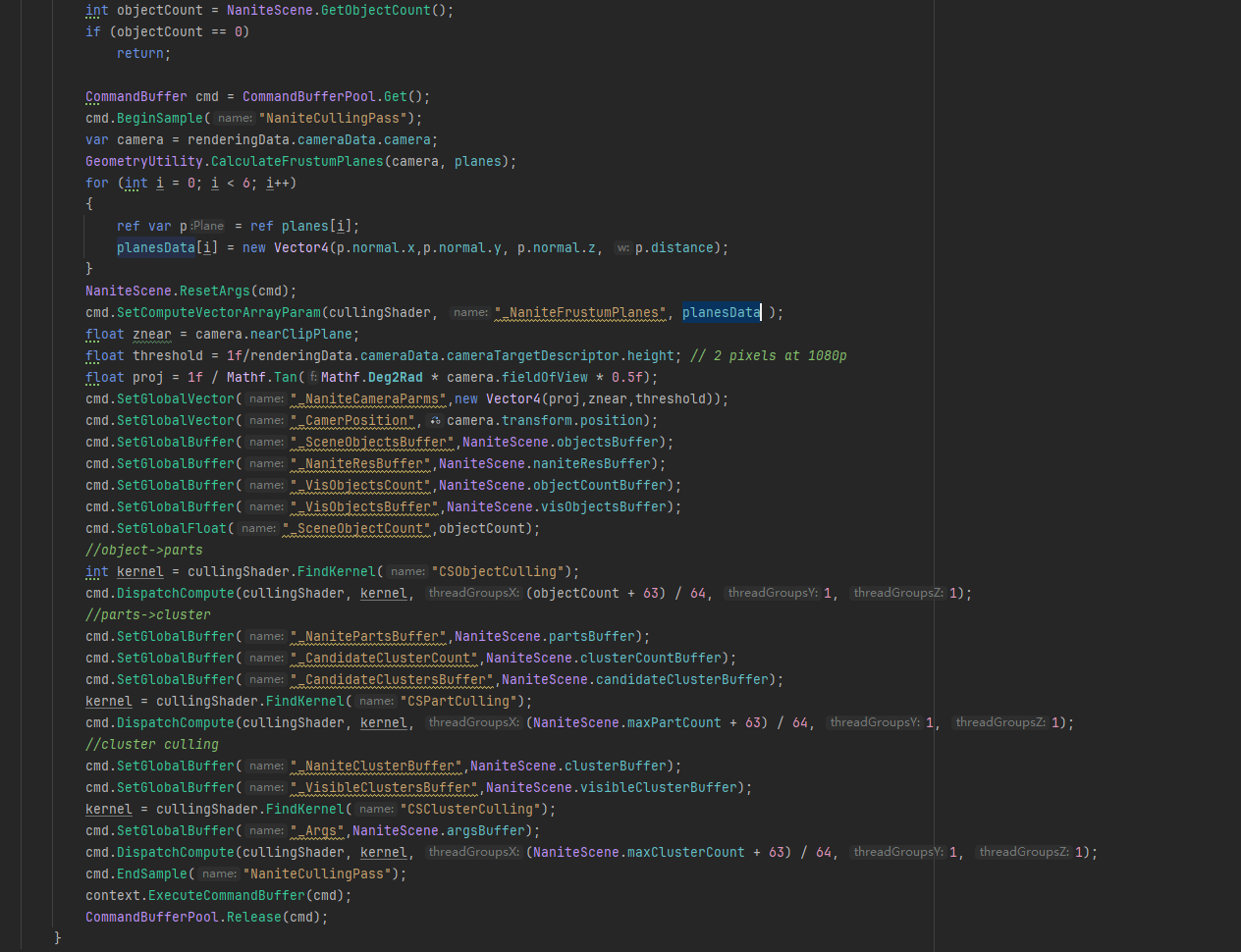
先从CPU发起剔除Compute Shader的Dispatch。这里因为组织数据时候就知道了所有Object最大的Parts/Cluster数量,所以直接用这个数去Dispatch了。
Objects剔除:
根据Object找到NaniteMesh的Parts进行Culling:
ClustersCulling:
6. 软光栅
略。
7. VisibilityBuffer
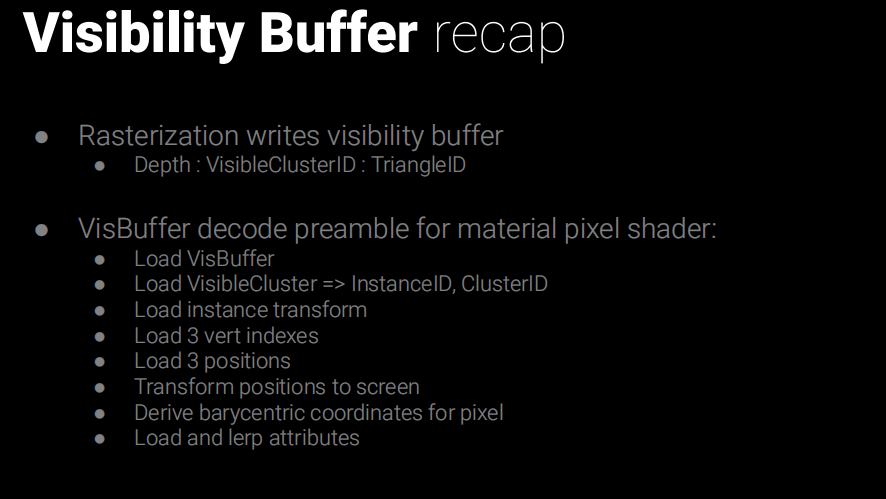
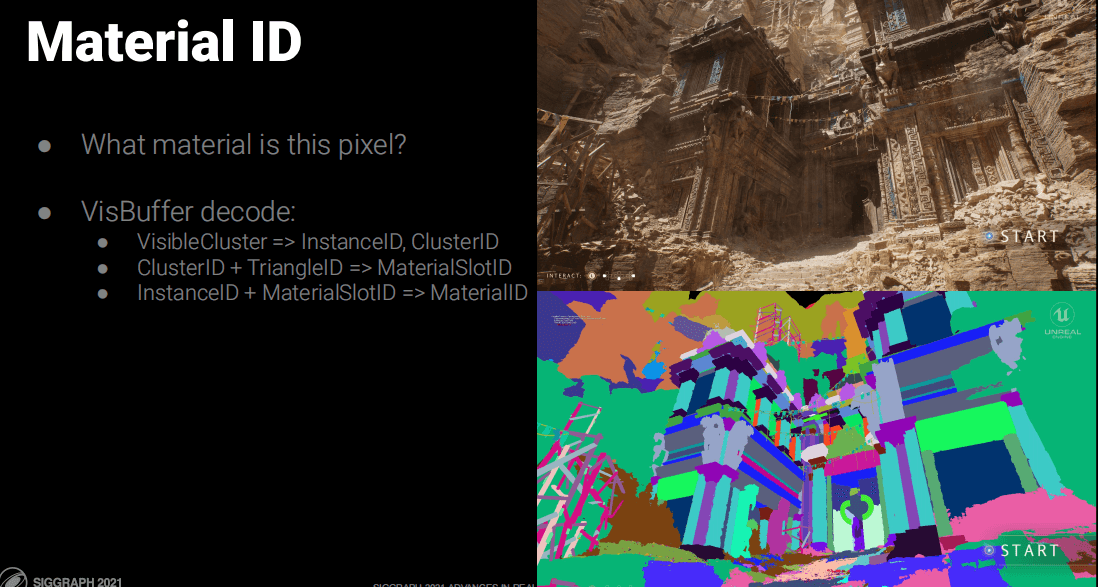
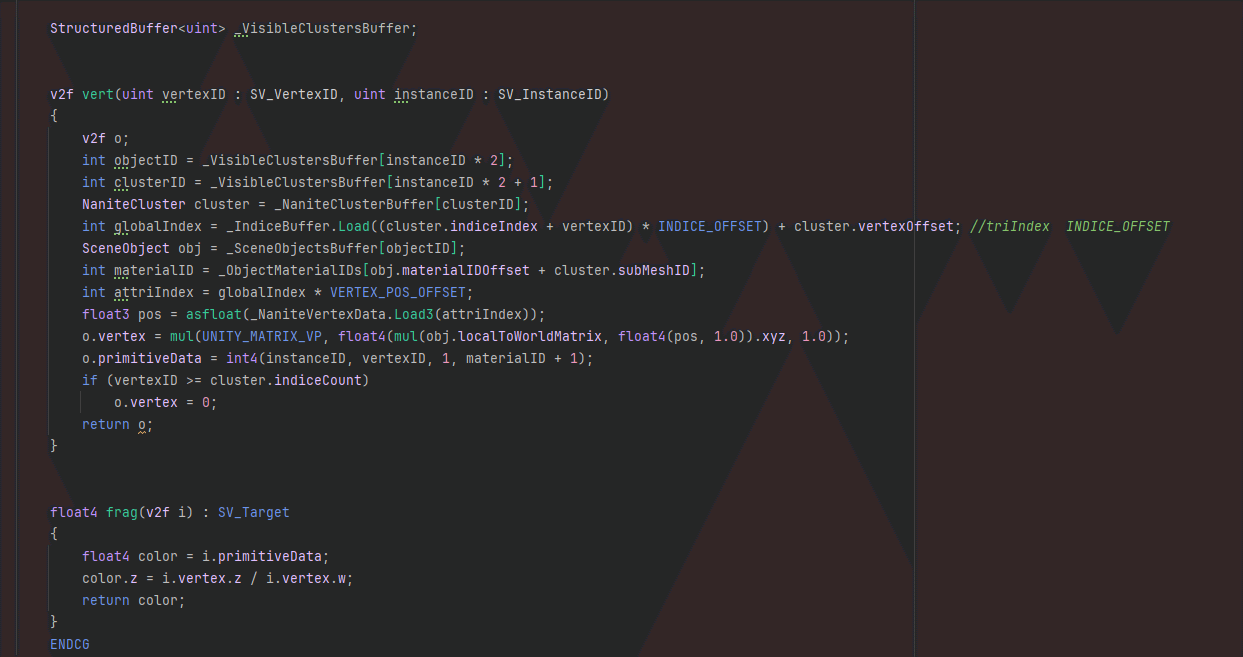
VBuffer主要用来减少Overdraw,着色器直接输出InstanceID、ClusterID、材质ID。然后用这个VBuffer来计算顶点数据来着色。
这个得益于GPUDriven的好处,一个DrawProceduralIndirect就可以绘制所有物体了:
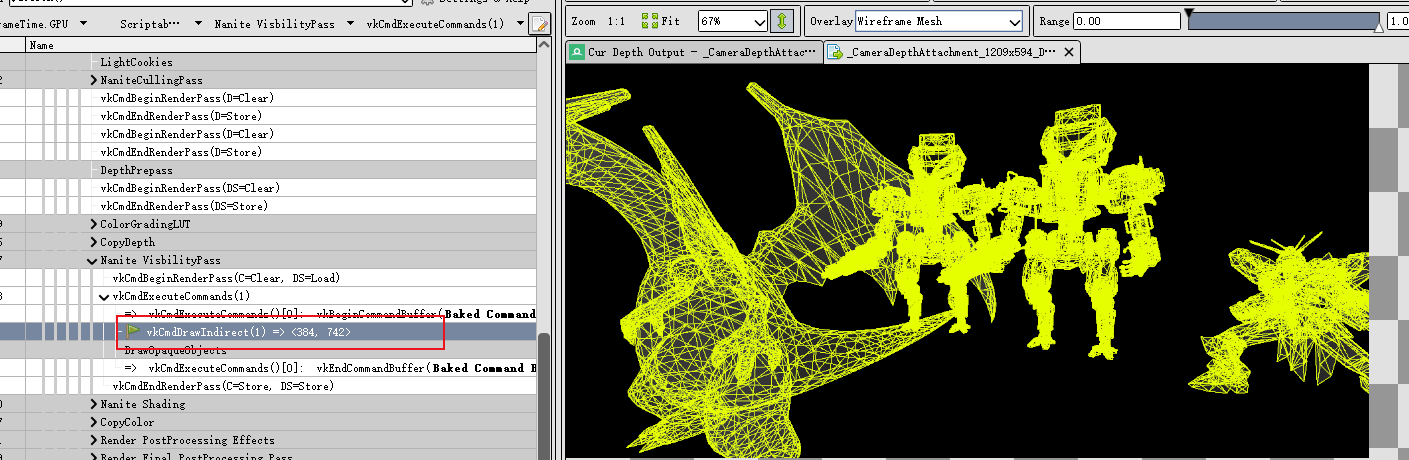
一次DrawProceduralIndirect绘制多个物体
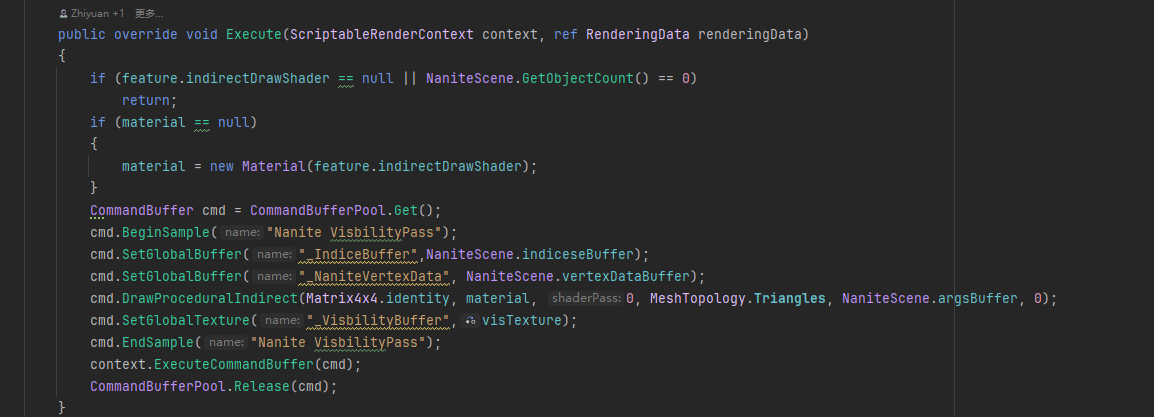
VBuffer存哪些属性,多少位,都是工程细节这里就不考究了。
8. 着色
有了VBuffer就需要逐材质进行绘制,原文是材质ID分Tile组合IndirectDraw画Quad的思想。
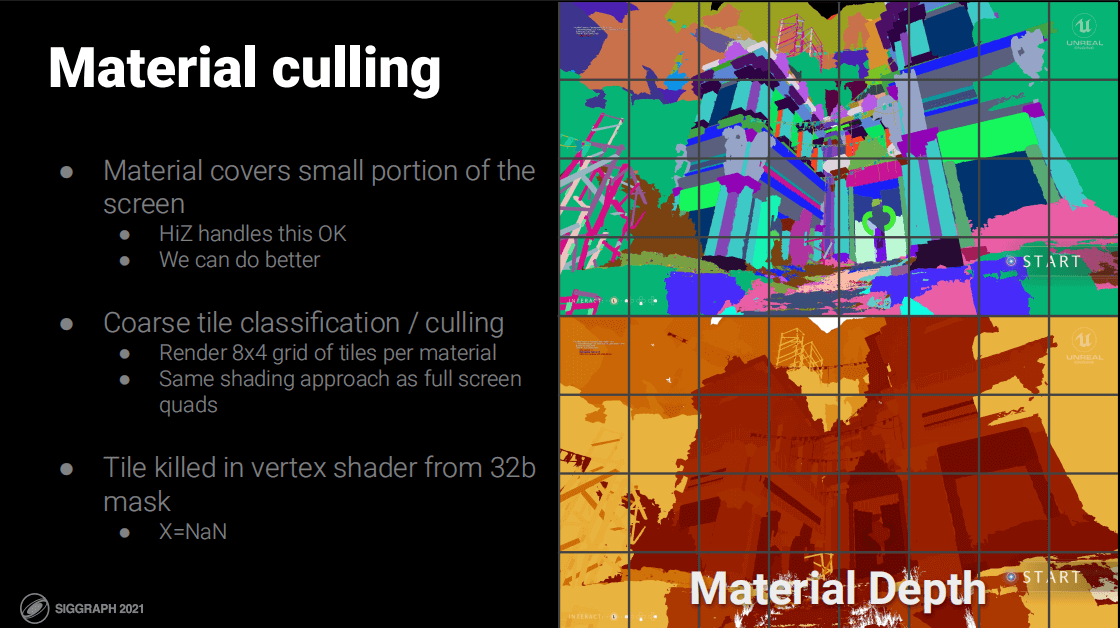
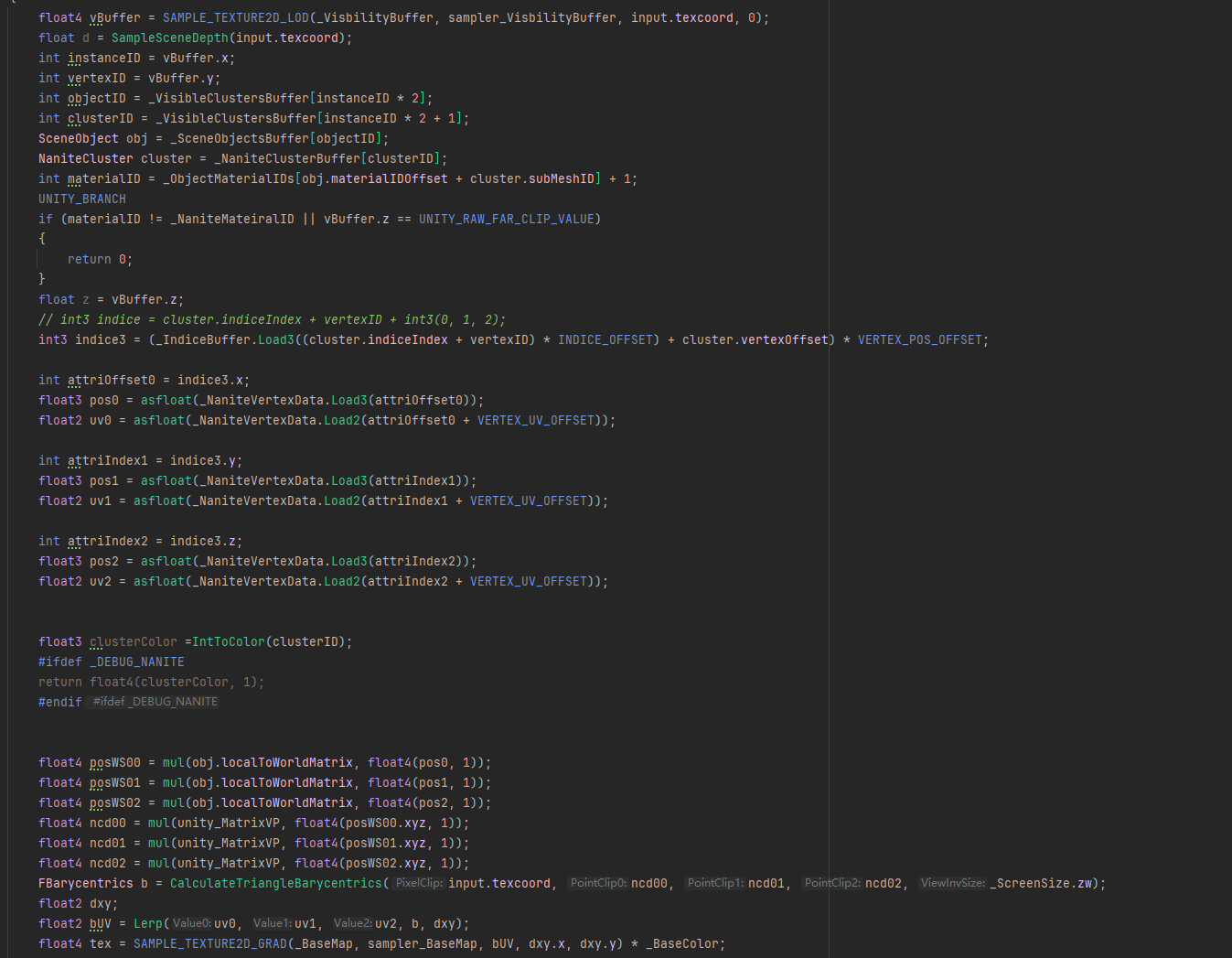
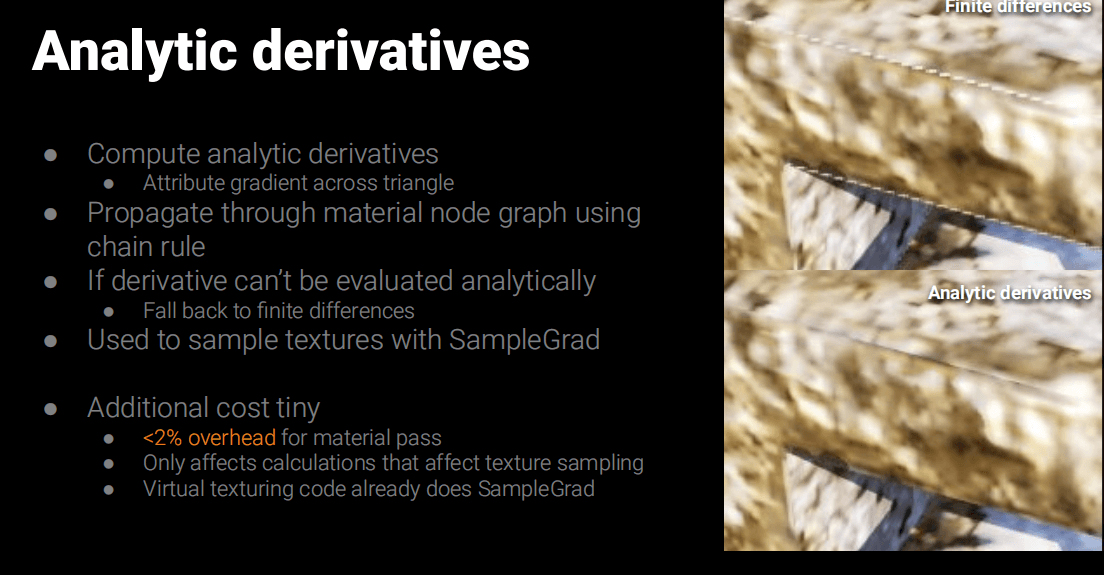
需要注意一下这里VBuffer通过三角重心插值求出的UV是不能直接采样贴图的,因为DDXY不对,所以需求重新计算,计算的代码放下面。并且利用SampleGrad(samplerName, coord2, dpdx, dpdy)来采样。
uint MurmurMix(uint Hash)
{
    Hash ^= Hash >> 16;
    Hash *= 0x85ebca6b;
    Hash ^= Hash >> 13;
    Hash *= 0xc2b2ae35;
    Hash ^= Hash >> 16;
    return Hash;
}
float3 IntToColor(uint Index)
{
    uint Hash = MurmurMix(Index);

    float3 Color = float3
    (
        (Hash >> 0) & 255,
        (Hash >> 8) & 255,
        (Hash >> 16) & 255
    );

    return Color * (1.0f / 255.0f);
}

struct FBarycentrics
{
    float3 Value;
    float3 Value_dx;
    float3 Value_dy;
};

float2 Lerp(float2 Value0, float2 Value1, float2 Value2, FBarycentrics Barycentrics, out float2 dxy)
{
    float2 Value = Value0 * Barycentrics.Value.x + Value1 * Barycentrics.Value.y + Value2 * Barycentrics.Value.z;
    dxy.x = Value0 * Barycentrics.Value_dx.x + Value1 * Barycentrics.Value_dx.y + Value2 * Barycentrics.Value_dx.z;
    dxy.y = Value0 * Barycentrics.Value_dy.x + Value1 * Barycentrics.Value_dy.y + Value2 * Barycentrics.Value_dy.z;

    return Value;
}

/** Calculates perspective correct barycentric coordinates and partial derivatives using screen derivatives. */
FBarycentrics CalculateTriangleBarycentrics(float2 PixelClip, float4 PointClip0, float4 PointClip1,
                                            float4 PointClip2, float2 ViewInvSize)
{
    FBarycentrics Barycentrics;
    PixelClip.y = 1 - PixelClip.y;
    PixelClip.xy = PixelClip.xy * 2 - 1;
    const float3 RcpW = rcp(float3(PointClip0.w, PointClip1.w, PointClip2.w));
    const float3 Pos0 = PointClip0.xyz * RcpW.x;
    const float3 Pos1 = PointClip1.xyz * RcpW.y;
    const float3 Pos2 = PointClip2.xyz * RcpW.z;

    const float3 Pos120X = float3(Pos1.x, Pos2.x, Pos0.x);
    const float3 Pos120Y = float3(Pos1.y, Pos2.y, Pos0.y);
    const float3 Pos201X = float3(Pos2.x, Pos0.x, Pos1.x);
    const float3 Pos201Y = float3(Pos2.y, Pos0.y, Pos1.y);

    const float3 C_dx = Pos201Y - Pos120Y;
    const float3 C_dy = Pos120X - Pos201X;

    const float3 C = C_dx * (PixelClip.x - Pos120X) + C_dy * (PixelClip.y - Pos120Y);
    // Evaluate the 3 edge functions
    const float3 G = C * RcpW;

    constfloat H = dot(C, RcpW);
    constfloat RcpH = rcp(H);

    // UVW = C * RcpW / dot(C, RcpW)
    Barycentrics.Value = G * RcpH;

    // Texture coordinate derivatives:
    // UVW = G / H where G = C * RcpW and H = dot(C, RcpW)
    // UVW' = (G' * H - G * H') / H^2
    // float2 TexCoordDX = UVW_dx.y * TexCoord10 + UVW_dx.z * TexCoord20;
    // float2 TexCoordDY = UVW_dy.y * TexCoord10 + UVW_dy.z * TexCoord20;
    const float3 G_dx = C_dx * RcpW;
    const float3 G_dy = C_dy * RcpW;

    constfloat H_dx = dot(C_dx, RcpW);
    constfloat H_dy = dot(C_dy, RcpW);

    Barycentrics.Value_dx = (G_dx * H - G * H_dx) * (RcpH * RcpH) * (2.0f * ViewInvSize.x);
    Barycentrics.Value_dy = (G_dy * H - G * H_dy) * (RcpH * RcpH) * (-2.0f * ViewInvSize.y);

    return Barycentrics;
}
到这里其实基本完成了,利用IntToColor函数,可以对ClustersID或者IndexID对三角形或Cluster进行可视化。
三、总结
不得不说Nanite技术真是太强大了,但是也有很多工程细节需要处理,本文只是实现了其中一小部分。整体像是处理图片的Mipmap过程。
参考
22.GPU驱动的几何管线-nanite (Part 2) | GAMES104-现代游戏引擎:从入门到实践
[UnrealCircle]Nanite技术简介 | Epic Games China 王祢
Karis_Nanite_SIGGRAPH_Advances_2021_final.pdf
UE5 Nanite源码入口:
Engine\Source\Runtime\Renderer\Private\Nanite\NaniteCullRaster.cpp (渲染流程入口)
Engine\Shaders\Private\Nanite\ (GPU的Shader入口)
Engine\Source\Developer\NaniteBuilder\Private\ (离线生成Nanite资源入口)
这是侑虎科技第1939篇文章,感谢作者傻头傻脑亚古兽供稿。欢迎转发分享,未经作者授权请勿转载。如果您有任何独到的见解或者发现也欢迎联系我们,一起探讨。(QQ群:793972859)
作者主页:https://www.zhihu.com/people/tian-cai-ya-gu-shou
再次感谢傻头傻脑亚古兽的分享,如果您有任何独到的见解或者发现也欢迎联系我们,一起探讨。(QQ群:793972859)